VOCABULARY / ENTRY
Push Notification
push-notification
A short message an app sends to the user through the operating system while the app is not open, appearing as a banner, a Lock Screen item, a sound or a badge; the user’s permission must be obtained before any is sent.
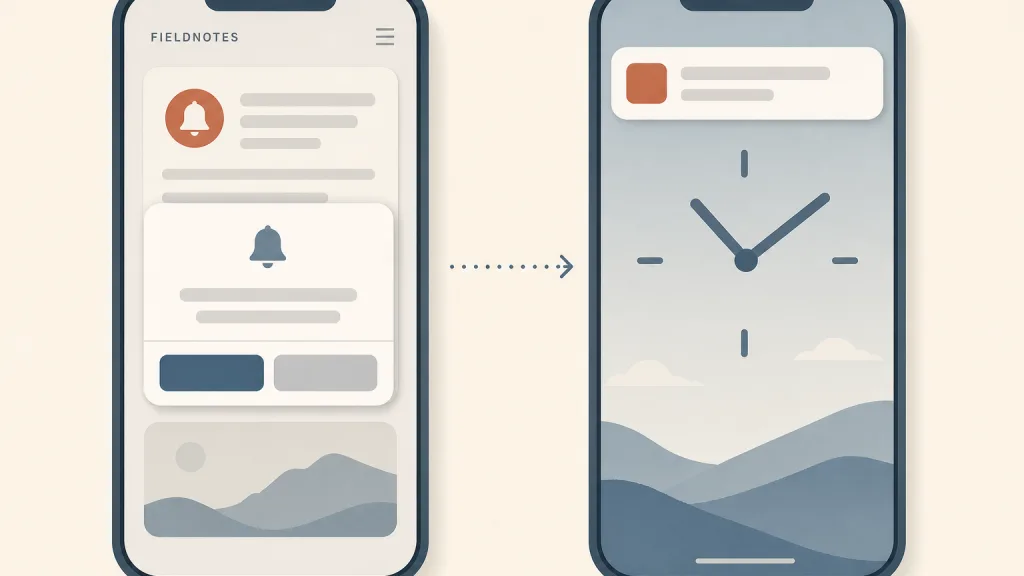
Recognizing it
- Presented by the system while the app is not open, appearing outside the app
- Needs the user’s permission before sending, and the user can turn it off in system settings at any time
- Brief content that takes the user to the relevant place in the app when tapped
Concept boundary
A push notification is an event at the moment of delivery: it appears from outside the app and interrupts whatever the user is doing. It is not a notification center — the notification center is where delivered notifications can be reviewed afterwards and decides whether they can still be found, while a push notification decides whether to interrupt at the time. Nor is it a notification dot: a dot is a passive marker attached to an entry point that shows no content and makes no sound, waiting to be noticed; a push notification brings content to the user. A banner shown inside the app while it is open is also outside this entry; that is an in-app message, which does not go through the system or need notification permission. The test is “through the system, outside the app, with the user’s prior consent”.
When to consider it
- The information is time-sensitive and the user would miss out without knowing promptly, such as an order status change or an incoming message
- The user has asked to be reminded, for example by tapping a reminder button or subscribing to an update
- The notification alone is enough for the user to decide whether it needs action
When to be cautious
- The permission request appears on first launch, before the user knows what the notifications are for
- The same thing is pushed repeatedly while the user has not responded
- Push is used to report an in-app error or to instruct the user to go back into the app and complete a task
- The notification text contains sensitive or private information others might see on the Lock Screen
Tradeoff
Push notifications are the only channel through which an app in the background can reach the user on its own initiative, and nothing else matches their timeliness; the cost is that each one is an interruption, and a single switch is all it takes for the user to withdraw permission for good. The more and the less relevant the messages, the faster the channel stops working.
Conditional rules · Editorial advice
Related entries
Push decides whether to interrupt at the moment of delivery, and the notification center keeps delivered notifications available for review afterwards; together they keep a missed notification from becoming a lost one.
A dot waits passively to be noticed without interrupting the current task; only truly time-sensitive information deserves an active interruption by push.
Do Not Disturb silences how pushes are presented without discarding them; apps should grade their notifications honestly by urgency rather than try to get around it.
Permission was given to receive useful information; using the channel for repeated urging turns it into nagging.
Calm technology argues for keeping information at the periphery of attention where possible, reminding the team to use push only for what truly needs immediate attention.
Sources and what they support
The guidelines open by stating that you have to get people’s consent before sending them any notifications, and that a notification can appear as a banner on the Lock Screen or desktop, a badge on the app icon, and an item in Notification Center. Best practices include keeping notifications concise and informative; not sending multiple notifications for the same thing even if someone has not responded, since that fills Notification Center and may lead people to turn off all notifications from the app; not using a notification to tell people to perform tasks in the app; using an alert rather than a notification for an error; and not including sensitive, personal or confidential information. This entry’s definition and several of its “when not” cases are paraphrased from it.
Retrieved: 2026-10-20 · Snapshot unconfirmedThe documentation explains that Android 13 (API level 33) introduced the POST_NOTIFICATIONS runtime permission, that notifications for newly installed apps are off by default and may be sent only after the permission is requested and granted, and recommends letting users get familiar with the app before asking and asking in a clear context — for example when the user taps an alert-bell button or has just submitted a food delivery order — so it is plain what the notifications are for and why to opt in. It also notes users can revoke the permission at any time and that apps should check notifications are still enabled before sending. This entry’s rules on the timing of the permission request are paraphrased from it.
Retrieved: 2026-10-20 · Snapshot unconfirmedDefinitions reference these sources. Digital specimens, selection advice, relationships, and recipes are editorial work and have not been validated through user research.
Type extensions and implementation notes
This entry has no runnable specimen; the illustration is an editorial sketch of the order between a permission request and a Lock Screen push banner, not a verified implementation. Permission flows and available notification levels differ by platform; before applying it to a product, follow the target platform’s current documentation and test what happens after permission is denied.
{
  "states": [
    "not-requested",
    "permission-denied",
    "permission-granted",
    "delivered",
    "opened",
    "dismissed"
  ],
  "a11y": [
    "The content does not rely on sound or vibration alone; the text itself is complete and readable",
    "Tapping the notification takes the user to the matching content and places focus on it",
    "When previews are hidden, a general description still says what kind of notification it is"
  ],
  "motion": "The system decides how the banner appears; the app adds no animation of its own"
}
Open the Agent JSON file for this entryThis file repeats every field of this entry verbatim and adds its sources, archive status, and editorial scope.