Design VocabularyDesign vocabulary · Edition 01

VOCABULARY / ENTRY

Search and Filter

search-and-filter

Add to comparison +

Search lets people narrow a set with a query they type; filtering lets them exclude items that do not match predefined attributes. Both must show the criteria currently in effect.
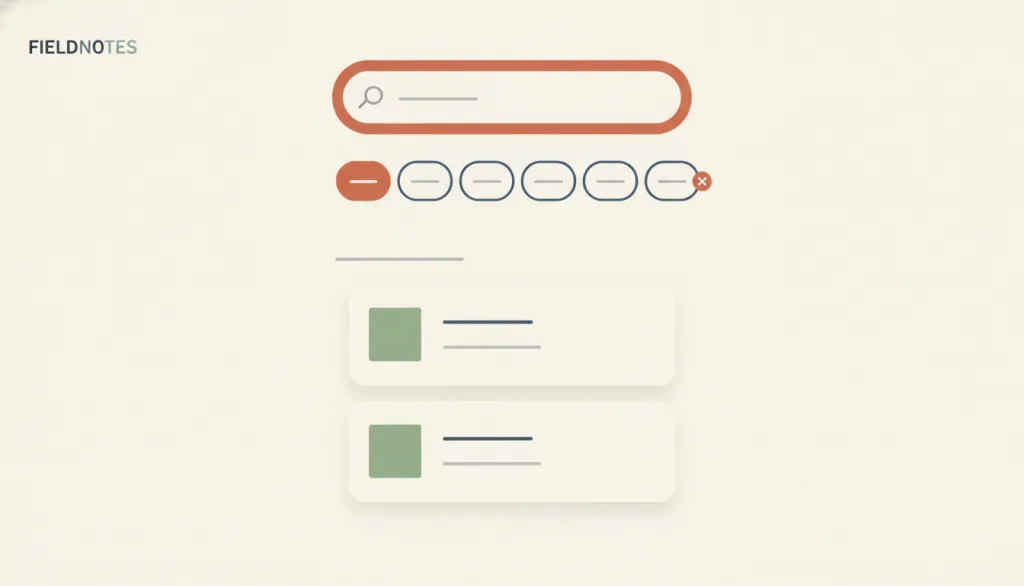
Illustration · Editorial artwork, no interactive specimen yet
A fictional FIELDNOTES list page: a search field at the top, a row of filter chips with one active, a placeholder result-count line, and a narrowed list of two or three result cards.

Recognizing it

  • The result set narrows as a query is typed or a facet is selected
  • Criteria in effect and the result count stay visible
  • Criteria can be removed one by one or cleared all at once

Concept boundary

Search takes free input from the person; filtering selects from predefined facets. They are often used side by side, but neither is master-detail: master-detail links a list to its detail, while search and filter decide how the set gets narrowed. If criteria are invisible, cannot be cleared, or there is no way back from zero results, it is not a complete search-and-filter pattern.

When to consider it

  • The set is too large to browse item by item and the goal can be expressed as words or attributes
  • Content has several distinguishable attribute dimensions and people need to narrow it from different angles
  • People arrive both with specific goals (search) and with a need to explore (filter)

When to be cautious

  • The set is small and browsing is faster than building criteria
  • Content has no stable, recognizable attributes, so facets cannot be maintained
  • People do not know the domain vocabulary, and a search box alone would leave them stranded

Tradeoff

People reach targets faster, but a facet structure is costly to build and maintain, and more options add comprehension load.

Conditional rules · Editorial advice

When Any search term or filter criterion is in effectMustList every active criterion above the results and show the current result count; do not show only the number of criteria.
When A combination of criteria yields zero resultsMustOffer a clear "clear all", keep what the person entered, and provide a path to recover, such as relaxing one criterion or suggesting alternatives.
When A person opens a result and comes back, or reloads or shares the pageRecommendedKeep the entered search term and selected facets; do not reset to the default state.

Related entries

Master–Detail ↗Works with · Narrowing the selectable items in the list pane of a master-detail layout

Search and filter decide what is in the list; master-detail decides how the selected item's detail is shown.

Recognition Rather Than Recall ↗Explains · Designing filter facets instead of offering only a search box

Predefined facets let people recognize available attributes instead of recalling and spelling out a query.

Progressive Disclosure ↗Works with · There are many facets and only some are used often

Keeping common facets visible and expanding the rest on demand keeps the filter area manageable.

Sources and what they support

NN/g · Filters vs. Facets: Definitions ↗

Filters exclude items that fail a criterion; faceted navigation offers one filter per aspect of the content and helps people understand the content space, at a higher cost to build and maintain and with added interaction cost.

Retrieved: 2026-09-15
NN/g · Search Is Not Enough: Synergy Between Navigation and Search ↗

Search alone is not enough: people unfamiliar with a domain struggle to form queries, navigation replaces recall with recognition, and facets turn search into navigation, so the two should complement each other.

Retrieved: 2026-09-15
Baymard Institute · Always Display an Applied Filters Overview ↗

An overview of applied filters should appear above the list so people can confirm, remove criteria, and understand the scope of results; showing only the number of applied filters is not enough.

Retrieved: 2026-09-15
Baymard Institute · No Results Page Design ↗

A no-results page should offer recovery paths such as related categories, alternative search suggestions, and popular content; search tips alone do not help people recover.

Retrieved: 2026-09-15

Definitions reference these sources. Digital specimens, selection advice, relationships, and recipes are editorial work and have not been validated through user research.

Type extensions and implementation notes

This entry has no operable specimen yet; the illustration is an editorial sketch. Before applying it to a product, verify the visibility of active criteria, the recovery path from zero results, whether criteria survive navigation, and how filters and result counts reach assistive technology.

{
  "states": [
    "idle",
    "querying",
    "narrowed",
    "empty",
    "cleared"
  ],
  "a11y": [
    "The search box has an accessible name, and facets can be selected with a keyboard and expose their selected state",
    "Changes to the result count are announced to assistive technology through a live region",
    "If autocomplete is offered, follow the WAI-ARIA combobox pattern"
  ],
  "motion": "Result updates do not depend on animation; the replaced list should be readable immediately"
}
Full Agent entry JSON
{
  "id": "search-and-filter",
  "type": "interaction",
  "name": {
    "zh": "搜索与筛选",
    "en": "Search and Filter"
  },
  "aliases": [
    "分面筛选",
    "Faceted Search",
    "Search & Filter"
  ],
  "granularity": "flow",
  "intents": [
    "find-item",
    "narrow-results"
  ],
  "tags": [
    "search",
    "filter",
    "facets",
    "result count",
    "no results"
  ],
  "definition": "Search lets people narrow a set with a query they type; filtering lets them exclude items that do not match predefined attributes. Both must show the criteria currently in effect.",
  "boundary": "Search takes free input from the person; filtering selects from predefined facets. They are often used side by side, but neither is master-detail: master-detail links a list to its detail, while search and filter decide how the set gets narrowed. If criteria are invisible, cannot be cleared, or there is no way back from zero results, it is not a complete search-and-filter pattern.",
  "signature": [
    "The result set narrows as a query is typed or a facet is selected",
    "Criteria in effect and the result count stay visible",
    "Criteria can be removed one by one or cleared all at once"
  ],
  "when": [
    "The set is too large to browse item by item and the goal can be expressed as words or attributes",
    "Content has several distinguishable attribute dimensions and people need to narrow it from different angles",
    "People arrive both with specific goals (search) and with a need to explore (filter)"
  ],
  "when_not": [
    "The set is small and browsing is faster than building criteria",
    "Content has no stable, recognizable attributes, so facets cannot be maintained",
    "People do not know the domain vocabulary, and a search box alone would leave them stranded"
  ],
  "tradeoff": "People reach targets faster, but a facet structure is costly to build and maintain, and more options add comprehension load.",
  "comparison": {
    "focus": "How the set is narrowed and how visible the current criteria are",
    "mechanism": "People enter or select criteria; the system excludes non-matching items",
    "cost": "Maintenance cost of facets and comprehension cost of more options"
  },
  "sources": [
    {
      "id": "nng-filters-vs-facets",
      "title": "NN/g · Filters vs. Facets: Definitions",
      "url": "https://www.nngroup.com/articles/filters-vs-facets/",
      "claim": "Filters exclude items that fail a criterion; faceted navigation offers one filter per aspect of the content and helps people understand the content space, at a higher cost to build and maintain and with added interaction cost.",
      "checkedAt": "2026-09-15",
      "archive": {
        "lookupUrl": "https://web.archive.org/web/20260915*/https://www.nngroup.com/articles/filters-vs-facets/",
        "status": "available",
        "checkedAt": "2026-09-15T18:20:59.765Z",
        "jobId": "spn2-5ae816af7fdb0586a3fb39815a087ee0ab40e575",
        "url": "https://web.archive.org/web/20260915182135/https://www.nngroup.com/articles/filters-vs-facets/",
        "timestamp": "20260915182135"
      }
    },
    {
      "id": "nng-search-not-enough",
      "title": "NN/g · Search Is Not Enough: Synergy Between Navigation and Search",
      "url": "https://www.nngroup.com/articles/search-not-enough/",
      "claim": "Search alone is not enough: people unfamiliar with a domain struggle to form queries, navigation replaces recall with recognition, and facets turn search into navigation, so the two should complement each other.",
      "checkedAt": "2026-09-15",
      "archive": {
        "lookupUrl": "https://web.archive.org/web/20260915*/https://www.nngroup.com/articles/search-not-enough/",
        "status": "available",
        "checkedAt": "2026-09-15T18:31:24.152Z",
        "jobId": "spn2-6aa431b458a3401ff4016d71ad673dad8663f1de",
        "url": "https://web.archive.org/web/20260915183158/https://www.nngroup.com/articles/search-not-enough/",
        "timestamp": "20260915183158"
      }
    },
    {
      "id": "baymard-applied-filters",
      "title": "Baymard Institute · Always Display an Applied Filters Overview",
      "url": "https://baymard.com/blog/how-to-design-applied-filters",
      "claim": "An overview of applied filters should appear above the list so people can confirm, remove criteria, and understand the scope of results; showing only the number of applied filters is not enough.",
      "checkedAt": "2026-09-15",
      "archive": {
        "lookupUrl": "https://web.archive.org/web/20260915*/https://baymard.com/blog/how-to-design-applied-filters",
        "status": "available",
        "checkedAt": "2026-09-15T18:21:21.636Z",
        "jobId": "spn2-f327dc0f761d8878521f4af16a166f1f89318db1",
        "url": "https://web.archive.org/web/20260915182253/https://baymard.com/blog/how-to-design-applied-filters",
        "timestamp": "20260915182253"
      }
    },
    {
      "id": "baymard-no-results",
      "title": "Baymard Institute · No Results Page Design",
      "url": "https://baymard.com/blog/no-results-page",
      "claim": "A no-results page should offer recovery paths such as related categories, alternative search suggestions, and popular content; search tips alone do not help people recover.",
      "checkedAt": "2026-09-15",
      "archive": {
        "lookupUrl": "https://web.archive.org/web/20260915*/https://baymard.com/blog/no-results-page",
        "status": "available",
        "checkedAt": "2026-09-15T18:21:34.580Z",
        "jobId": "spn2-b41438d37a62070f4bb5453e2acf9bf5b2259a11",
        "url": "https://web.archive.org/web/20260915182158/https://baymard.com/blog/no-results-page",
        "timestamp": "20260915182158"
      }
    }
  ],
  "relations": [
    {
      "target": "master-detail",
      "kind": "composes_with",
      "condition": "Narrowing the selectable items in the list pane of a master-detail layout",
      "reason": "Search and filter decide what is in the list; master-detail decides how the selected item's detail is shown.",
      "basis": "editorial"
    },
    {
      "target": "recognition",
      "kind": "informs",
      "condition": "Designing filter facets instead of offering only a search box",
      "reason": "Predefined facets let people recognize available attributes instead of recalling and spelling out a query.",
      "basis": "editorial"
    },
    {
      "target": "progressive-disclosure",
      "kind": "composes_with",
      "condition": "There are many facets and only some are used often",
      "reason": "Keeping common facets visible and expanding the rest on demand keeps the filter area manageable.",
      "basis": "editorial"
    }
  ],
  "rules": [
    {
      "when": "Any search term or filter criterion is in effect",
      "instruction": "List every active criterion above the results and show the current result count; do not show only the number of criteria.",
      "strength": "must",
      "basis": "editorial"
    },
    {
      "when": "A combination of criteria yields zero results",
      "instruction": "Offer a clear \"clear all\", keep what the person entered, and provide a path to recover, such as relaxing one criterion or suggesting alternatives.",
      "strength": "must",
      "basis": "editorial"
    },
    {
      "when": "A person opens a result and comes back, or reloads or shares the page",
      "instruction": "Keep the entered search term and selected facets; do not reset to the default state.",
      "strength": "recommend",
      "basis": "editorial"
    }
  ],
  "behavior": {
    "states": [
      "idle",
      "querying",
      "narrowed",
      "empty",
      "cleared"
    ],
    "a11y": [
      "The search box has an accessible name, and facets can be selected with a keyboard and expose their selected state",
      "Changes to the result count are announced to assistive technology through a live region",
      "If autocomplete is offered, follow the WAI-ARIA combobox pattern"
    ],
    "motion": "Result updates do not depend on animation; the replaced list should be readable immediately"
  },
  "demo": null,
  "version": "0.1.0",
  "editorialStatus": "drafted",
  "requirements": [],
  "demoCapabilities": [],
  "implementationNote": "This entry has no operable specimen yet; the illustration is an editorial sketch. Before applying it to a product, verify the visibility of active criteria, the recovery path from zero results, whether criteria survive navigation, and how filters and result counts reach assistive technology.",
  "image": {
    "src": "/images/search-and-filter.webp",
    "alt": "A fictional FIELDNOTES list page: a search field at the top, a row of filter chips with one active, a placeholder result-count line, and a narrowed list of two or three result cards."
  },
  "searchTerms": [
    "搜索",
    "筛选",
    "分面",
    "结果数",
    "无结果"
  ]
}