VOCABULARY / ENTRY
Direct Manipulation
direct-manipulation
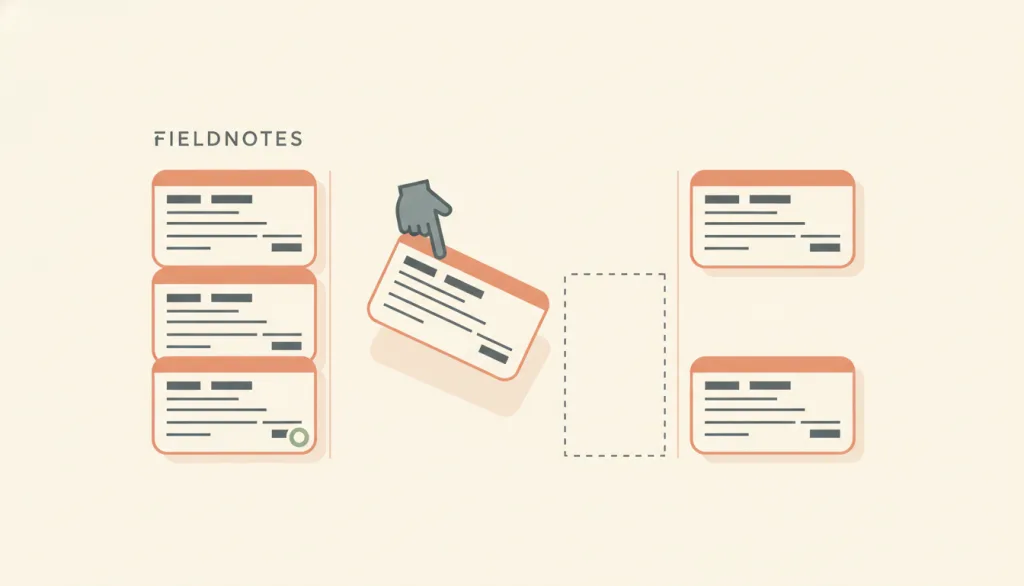
An interaction style in which people act directly on continuously displayed objects of interest, using physical actions such as clicking, dragging, and touching instead of command syntax; operations are incremental, rapid, and reversible, and their effects are immediately visible on screen. The term was coined by Shneiderman in 1983.
Recognizing it
- The object of interest stays displayed on screen, and people act on the object itself
- Operations are performed with physical actions such as clicking, dragging, or touching, with no commands to remember
- The effect of every step is immediately visible and can be undone or reversed
Concept boundary
Direct manipulation is a concept at the level of interaction style, not a specific control: drag and drop, resize handles, sliders, and pinch-to-zoom are realizations of it, and inline edit is one concrete editing situation of it, not a synonym. The test is whether four traits hold together: the object stays visible, physical actions replace commands, operations are incremental and reversible, and effects appear immediately. An interface with gestures but no visible object, or whose effects only show after a submit, does not qualify.
When to consider it
- The task is inherently spatial or continuous, such as sorting, moving, resizing, or setting a range
- People need to try and look, converging on the result through immediate feedback
- Beginners or occasional users learn by recognizing visible objects rather than recalling commands
When to be cautious
- Many objects need bulk or repetitive operations, where dragging one by one is far slower than a command or a bulk control
- The target objects are invisible or too numerous to display, since direct manipulation only acts on what can be seen
- Precise values matter more than feel, such as entering an exact size or date, where dragging invites error
Tradeoff
Gains a sense of control, low learning cost, and immediate error correction, at the cost of acting only on visible objects, poor efficiency for bulk and repetitive tasks, and barriers for people with motor or visual impairments when fine dragging is required; a non-dragging alternative path must always be provided.
Conditional rules · Editorial advice
Related entries
Inline edit applies direct manipulation to editing: the object stays visible, it is changed in place, and the effect appears immediately. It is one concrete situation of direct manipulation, not a synonym.
Direct manipulation relies on incremental, reversible steps so people can adjust as they go; undo and live preview during a drag defuse errors before or just as they happen.
Direct manipulation is easy to learn because objects and available actions are visible, so people operate by recognition rather than by recalling commands.
A wizard guides with a controlled sequence, while direct manipulation lets people freely handle objects; they suit different task structures, so an ordered flow should not be turned into free drag and drop just to look intuitive.
Sources and what they support
Direct manipulation is an interaction style in which people act on displayed objects of interest using physical, incremental, and reversible actions whose effects are immediately visible; its traits are continuous representation, physical actions instead of command syntax, continuous feedback with reversibility, and rapid learning; Shneiderman coined the term in his 1983 paper; drawbacks include acting only on visible objects, poor efficiency for bulk and repetitive tasks, and accessibility challenges for people with motor or visual impairments.
Retrieved: 2026-09-15All functionality that uses a dragging movement must be achievable by a single pointer without dragging, unless dragging is essential or determined by the user agent rather than the author; the criterion is Level AA and serves people who cannot drag precisely or who use trackballs, head pointers, eye-gaze, or similar input devices; alternatives include clicking anywhere on a track, entering a precise value, adjacent move-up and move-down controls, or a move menu opened by clicking.
Retrieved: 2026-09-15 · Archived 2026-09-16Definitions reference these sources. Digital specimens, selection advice, relationships, and recipes are editorial work and have not been validated through user research.
Type extensions and implementation notes
This entry has no operable specimen yet; the illustration is an editorial sketch. When applied to a product, verify that every drag operation has a non-dragging and keyboard alternative, that effects are immediately visible and reversible, and that essential functions have a visible entry point beyond dragging.
{
"states": [
"idle",
"grabbed",
"dragging",
"dropped",
"reverted"
],
"a11y": [
"Every draggable object has an accessible name and can be selected, moved, and dropped with a keyboard",
"A non-dragging single-pointer equivalent exists, such as move-up and move-down buttons or a move menu",
"Position changes during a drag and the drop result are announced to assistive technology as text"
],
"motion": "Following the pointer during a drag is essential feedback; the settle animation can be omitted, and under reduced-motion preference the item is placed directly at its target"
}Full Agent entry JSON
{
"id": "direct-manipulation",
"type": "interaction",
"name": {
"zh": "直接操纵",
"en": "Direct Manipulation"
},
"aliases": [
"直接操作",
"Direct Manipulation Interface",
"DM interface"
],
"granularity": "component",
"intents": [
"manipulate-object"
],
"tags": [
"drag and drop",
"reversible",
"immediate feedback",
"objects",
"handles"
],
"definition": "An interaction style in which people act directly on continuously displayed objects of interest, using physical actions such as clicking, dragging, and touching instead of command syntax; operations are incremental, rapid, and reversible, and their effects are immediately visible on screen. The term was coined by Shneiderman in 1983.",
"boundary": "Direct manipulation is a concept at the level of interaction style, not a specific control: drag and drop, resize handles, sliders, and pinch-to-zoom are realizations of it, and inline edit is one concrete editing situation of it, not a synonym. The test is whether four traits hold together: the object stays visible, physical actions replace commands, operations are incremental and reversible, and effects appear immediately. An interface with gestures but no visible object, or whose effects only show after a submit, does not qualify.",
"signature": [
"The object of interest stays displayed on screen, and people act on the object itself",
"Operations are performed with physical actions such as clicking, dragging, or touching, with no commands to remember",
"The effect of every step is immediately visible and can be undone or reversed"
],
"when": [
"The task is inherently spatial or continuous, such as sorting, moving, resizing, or setting a range",
"People need to try and look, converging on the result through immediate feedback",
"Beginners or occasional users learn by recognizing visible objects rather than recalling commands"
],
"when_not": [
"Many objects need bulk or repetitive operations, where dragging one by one is far slower than a command or a bulk control",
"The target objects are invisible or too numerous to display, since direct manipulation only acts on what can be seen",
"Precise values matter more than feel, such as entering an exact size or date, where dragging invites error"
],
"tradeoff": "Gains a sense of control, low learning cost, and immediate error correction, at the cost of acting only on visible objects, poor efficiency for bulk and repetitive tasks, and barriers for people with motor or visual impairments when fine dragging is required; a non-dragging alternative path must always be provided.",
"comparison": {
"focus": "Letting people act directly on visible objects instead of describing the desired result indirectly through commands or forms",
"mechanism": "Keeping objects continuously displayed and mapping physical actions to incremental, reversible, immediately visible operations",
"cost": "Providing a single-pointer non-dragging or keyboard alternative for every drag operation, plus implementing undo and live feedback"
},
"sources": [
{
"id": "nng-direct-manipulation",
"title": "NN/g · Direct Manipulation: Definition",
"url": "https://www.nngroup.com/articles/direct-manipulation/",
"claim": "Direct manipulation is an interaction style in which people act on displayed objects of interest using physical, incremental, and reversible actions whose effects are immediately visible; its traits are continuous representation, physical actions instead of command syntax, continuous feedback with reversibility, and rapid learning; Shneiderman coined the term in his 1983 paper; drawbacks include acting only on visible objects, poor efficiency for bulk and repetitive tasks, and accessibility challenges for people with motor or visual impairments.",
"checkedAt": "2026-09-15",
"archive": {
"lookupUrl": "https://web.archive.org/web/20260915*/https://www.nngroup.com/articles/direct-manipulation/",
"status": "available",
"checkedAt": "2026-09-15T18:45:03.812Z",
"jobId": "spn2-ac56bde0a577549afc6187c245521d3059a59aa0",
"url": "https://web.archive.org/web/20260915184528/https://www.nngroup.com/articles/direct-manipulation/",
"timestamp": "20260915184528"
}
},
{
"id": "wcag-dragging-movements",
"title": "W3C · Understanding SC 2.5.7: Dragging Movements (WCAG 2.2, Level AA)",
"url": "https://www.w3.org/WAI/WCAG22/Understanding/dragging-movements.html",
"claim": "All functionality that uses a dragging movement must be achievable by a single pointer without dragging, unless dragging is essential or determined by the user agent rather than the author; the criterion is Level AA and serves people who cannot drag precisely or who use trackballs, head pointers, eye-gaze, or similar input devices; alternatives include clicking anywhere on a track, entering a precise value, adjacent move-up and move-down controls, or a move menu opened by clicking.",
"checkedAt": "2026-09-15",
"archive": {
"lookupUrl": "https://web.archive.org/web/20260915*/https://www.w3.org/WAI/WCAG22/Understanding/dragging-movements.html",
"status": "available",
"checkedAt": "2026-09-16T03:49:42.520Z",
"jobId": "spn2-de0b078ac0d810da71f0131e386164242929d831",
"url": "https://web.archive.org/web/20260916035006/https://www.w3.org/WAI/WCAG22/Understanding/dragging-movements.html",
"timestamp": "20260916035006"
}
}
],
"relations": [
{
"target": "inline-edit",
"kind": "realized_by",
"condition": "Changing a short field directly in its reading position",
"reason": "Inline edit applies direct manipulation to editing: the object stays visible, it is changed in place, and the effect appears immediately. It is one concrete situation of direct manipulation, not a synonym.",
"basis": "editorial"
},
{
"target": "error-prevention",
"kind": "composes_with",
"condition": "Designing the reversibility of drag, resize, and similar operations",
"reason": "Direct manipulation relies on incremental, reversible steps so people can adjust as they go; undo and live preview during a drag defuse errors before or just as they happen.",
"basis": "editorial"
},
{
"target": "recognition",
"kind": "informs",
"condition": "Deciding which objects and actions stay continuously visible",
"reason": "Direct manipulation is easy to learn because objects and available actions are visible, so people operate by recognition rather than by recalling commands.",
"basis": "editorial"
},
{
"target": "wizard",
"kind": "alternative",
"condition": "The task has a fixed order and later steps depend on earlier input",
"reason": "A wizard guides with a controlled sequence, while direct manipulation lets people freely handle objects; they suit different task structures, so an ordered flow should not be turned into free drag and drop just to look intuitive.",
"basis": "editorial"
}
],
"rules": [
{
"when": "Any functionality depends on a dragging movement",
"instruction": "Provide a single-pointer alternative that works without dragging and a keyboard path, such as clicking the track, entering a value, move-up and move-down buttons, or a move menu; make an exception only when dragging is essential to the function.",
"strength": "must",
"basis": "editorial"
},
{
"when": "People are operating on an object",
"instruction": "Show the effect of each step on screen immediately and allow undo or reversal; do not wait until a submit to reveal the result.",
"strength": "must",
"basis": "editorial"
},
{
"when": "A function is essential to completing the task",
"instruction": "Do not hide it only behind a drag or gesture; provide a visible entry point such as a button or menu.",
"strength": "recommend",
"basis": "editorial"
}
],
"behavior": {
"states": [
"idle",
"grabbed",
"dragging",
"dropped",
"reverted"
],
"a11y": [
"Every draggable object has an accessible name and can be selected, moved, and dropped with a keyboard",
"A non-dragging single-pointer equivalent exists, such as move-up and move-down buttons or a move menu",
"Position changes during a drag and the drop result are announced to assistive technology as text"
],
"motion": "Following the pointer during a drag is essential feedback; the settle animation can be omitted, and under reduced-motion preference the item is placed directly at its target"
},
"demo": null,
"version": "0.1.0",
"editorialStatus": "drafted",
"requirements": [],
"demoCapabilities": [],
"implementationNote": "This entry has no operable specimen yet; the illustration is an editorial sketch. When applied to a product, verify that every drag operation has a non-dragging and keyboard alternative, that effects are immediately visible and reversible, and that essential functions have a visible entry point beyond dragging.",
"image": {
"src": "/images/direct-manipulation.webp",
"alt": "A fictional FIELDNOTES board: a card is being dragged by a hand cursor from the left column toward the right column, where a dashed drop placeholder waits, and another card in the left column shows a resize handle at its corner."
},
"searchTerms": [
"拖放",
"可逆",
"即时反馈",
"对象",
"手柄"
]
}