Design VocabularyDesign vocabulary · Edition 01

VOCABULARY / ENTRY

Wizard

wizard

Add to comparison +

Split a task into several pages completed in a prescribed order, where later steps may depend on information entered earlier; people move between pages with Next and Back.
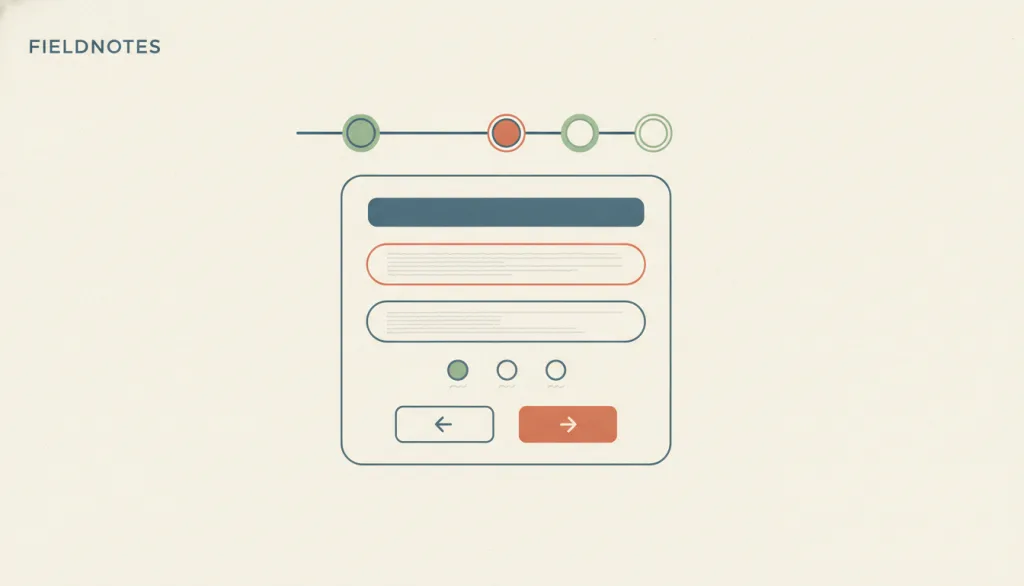
Illustration · Editorial artwork, no interactive specimen yet
A fictional FIELDNOTES setup screen: a four-step progress indicator at the top with the second step highlighted, one focused form section in the middle, and Back and Next buttons at the bottom left and right.

Recognizing it

  • Steps have a fixed order, and the current position and total count are shown
  • Each step handles one aspect of the task, with explicit Next and Back
  • Going back keeps what has already been entered

Concept boundary

A wizard is a flow pattern, not a page structure: it prescribes fixed, ordered stages with explicit Next, Back, and progress. That differs from progressive disclosure, which expands on demand, and from a single-column long form that puts every field on one page. If every question fits on one page, or the questions do not depend on each other, a wizard is usually unnecessary.

When to consider it

  • Tasks for beginners or done infrequently, such as first-time configuration, installation, or connecting a device
  • Later questions depend on earlier answers and must be collected in order
  • A one-off task has more steps than fit comfortably on one page

When to be cautious

  • Frequent, repeated tasks by experienced people, where clicking through pages feels tedious and controlling
  • The questions have no ordering dependency, so a dialog or single-page form is lighter
  • Several unrelated tasks are forced into one wizard

Tradeoff

Gains focus at each step and guidance for beginners, at the cost of more clicks and page changes; with too many steps or branches people lose track of where they are.

Conditional rules · Editorial advice

When At any stepMustShow the current step position and total count, and allow going back without losing what has been entered.
When Information the person already entered is needed again in the same processMustAuto-populate it or offer it for selection instead of asking again; only make exceptions when re-entry is essential, security-related, or the information is no longer valid.
When Planning the content of each stepRecommendedKeep each step focused on one decision; do not cram several sub-tasks or tabs into one page.
When The person wants to leave midwayRecommendedProvide an exit and state the consequence, for example whether entered data is saved and whether they can resume later.

Related entries

Progressive Disclosure ↗Related, but different · Secondary content can be expanded on demand without a fixed order

Progressive disclosure lets people decide when to expand; a wizard prescribes the order of stages. Do not turn optional settings into mandatory steps just because there is a lot of content.

Single-Column Layout ↗Works with · Designing an individual step page inside a wizard

Each step focuses on one decision, and a single-column form keeps that step's field order clear and undistracted.

Error Prevention ↗Realized by · Each step can be validated immediately once the task is split

Splitting input into ordered steps lets errors be caught and fixed before moving on, instead of reporting them only after a whole long form is submitted.

Modal Dialog ↗Works with · The task must be completed before the main interface can be used again

A wizard can live inside a modal container, but that adds the cost of interruption; prefer embedding the wizard as a page when possible.

Sources and what they support

NN/g · Wizards: Definition and Design Recommendations ↗

A wizard is a step-by-step process in which people enter information in a prescribed order and later steps may depend on earlier input; it recommends listing the steps with the current one highlighted, next and previous navigation, self-sufficient steps, letting people exit midway with saved state, and using wizards mainly for novices or infrequent processes.

Retrieved: 2026-09-15 · Archived 2026-09-16
Microsoft Learn · Wizards (Windows UX guide) ↗

Wizards are for multi-step tasks whose steps add up to one task from the user's point of view; each page should cover one aspect; Next implies no commitment, Back should always be available and selections must survive navigation; consider lighter alternatives such as dialogs or single pages first.

Retrieved: 2026-09-15
W3C · Understanding SC 3.3.7: Redundant Entry (WCAG 2.2, Level A) ↗

Information previously entered by or provided to the user that must be entered again in the same process should be auto-populated or available to select; exceptions are when re-entry is essential, required for security, or the information is no longer valid. The criterion exists to help people complete multi-step processes.

Retrieved: 2026-09-15 · Archived 2026-09-16

Definitions reference these sources. Digital specimens, selection advice, relationships, and recipes are editorial work and have not been validated through user research.

Type extensions and implementation notes

This entry has no operable specimen yet; the illustration is an editorial sketch. When applied to a product, verify that going back preserves input, that assistive technology announces the step position, and that no step asks again for information already provided.

{
  "states": [
    "step-active",
    "step-completed",
    "step-pending",
    "validating",
    "committed",
    "exited"
  ],
  "a11y": [
    "The step indicator exposes the current position as text, for example step 2 of 4",
    "After a step change, focus moves to the new step's heading or first control",
    "Back and Next are real, keyboard-operable buttons"
  ],
  "motion": "Step changes do not depend on animation; under reduced-motion preference the content is swapped directly"
}
Full Agent entry JSON
{
  "id": "wizard",
  "type": "interaction",
  "name": {
    "zh": "分步向导",
    "en": "Wizard"
  },
  "aliases": [
    "向导",
    "分步流程",
    "setup wizard"
  ],
  "granularity": "flow",
  "intents": [
    "configure",
    "reduce-complexity"
  ],
  "tags": [
    "steps",
    "setup",
    "beginners",
    "back",
    "progress"
  ],
  "definition": "Split a task into several pages completed in a prescribed order, where later steps may depend on information entered earlier; people move between pages with Next and Back.",
  "boundary": "A wizard is a flow pattern, not a page structure: it prescribes fixed, ordered stages with explicit Next, Back, and progress. That differs from progressive disclosure, which expands on demand, and from a single-column long form that puts every field on one page. If every question fits on one page, or the questions do not depend on each other, a wizard is usually unnecessary.",
  "signature": [
    "Steps have a fixed order, and the current position and total count are shown",
    "Each step handles one aspect of the task, with explicit Next and Back",
    "Going back keeps what has already been entered"
  ],
  "when": [
    "Tasks for beginners or done infrequently, such as first-time configuration, installation, or connecting a device",
    "Later questions depend on earlier answers and must be collected in order",
    "A one-off task has more steps than fit comfortably on one page"
  ],
  "when_not": [
    "Frequent, repeated tasks by experienced people, where clicking through pages feels tedious and controlling",
    "The questions have no ordering dependency, so a dialog or single-page form is lighter",
    "Several unrelated tasks are forced into one wizard"
  ],
  "tradeoff": "Gains focus at each step and guidance for beginners, at the cost of more clicks and page changes; with too many steps or branches people lose track of where they are.",
  "comparison": {
    "focus": "Guiding people through a single task in a prescribed order",
    "mechanism": "Breaking the task into ordered pages linked by navigation buttons and a progress indicator",
    "cost": "Extra page transitions, plus the implementation burden of preserving state and providing an exit path"
  },
  "sources": [
    {
      "id": "nng-wizards",
      "title": "NN/g · Wizards: Definition and Design Recommendations",
      "url": "https://www.nngroup.com/articles/wizards/",
      "claim": "A wizard is a step-by-step process in which people enter information in a prescribed order and later steps may depend on earlier input; it recommends listing the steps with the current one highlighted, next and previous navigation, self-sufficient steps, letting people exit midway with saved state, and using wizards mainly for novices or infrequent processes.",
      "checkedAt": "2026-09-15",
      "archive": {
        "lookupUrl": "https://web.archive.org/web/20260915*/https://www.nngroup.com/articles/wizards/",
        "status": "available",
        "checkedAt": "2026-09-16T04:18:31.200Z",
        "jobId": "spn2-68c8f2410a7c9c9c5a1635be180c8e07a9e17593",
        "url": "https://web.archive.org/web/20260916041857/https://www.nngroup.com/articles/wizards/",
        "timestamp": "20260916041857"
      }
    },
    {
      "id": "ms-win-wizards",
      "title": "Microsoft Learn · Wizards (Windows UX guide)",
      "url": "https://learn.microsoft.com/en-us/windows/win32/uxguide/win-wizards",
      "claim": "Wizards are for multi-step tasks whose steps add up to one task from the user's point of view; each page should cover one aspect; Next implies no commitment, Back should always be available and selections must survive navigation; consider lighter alternatives such as dialogs or single pages first.",
      "checkedAt": "2026-09-15",
      "archive": {
        "lookupUrl": "https://web.archive.org/web/20260915*/https://learn.microsoft.com/en-us/windows/win32/uxguide/win-wizards",
        "status": "available",
        "checkedAt": "2026-09-15T18:35:11.212Z",
        "jobId": "spn2-86d4406779219d57c5806545c97b47c6d077d8e6",
        "url": "https://web.archive.org/web/20260915183647/https://learn.microsoft.com/en-us/windows/win32/uxguide/win-wizards",
        "timestamp": "20260915183647"
      }
    },
    {
      "id": "wcag-redundant-entry",
      "title": "W3C · Understanding SC 3.3.7: Redundant Entry (WCAG 2.2, Level A)",
      "url": "https://www.w3.org/WAI/WCAG22/Understanding/redundant-entry.html",
      "claim": "Information previously entered by or provided to the user that must be entered again in the same process should be auto-populated or available to select; exceptions are when re-entry is essential, required for security, or the information is no longer valid. The criterion exists to help people complete multi-step processes.",
      "checkedAt": "2026-09-15",
      "archive": {
        "lookupUrl": "https://web.archive.org/web/20260915*/https://www.w3.org/WAI/WCAG22/Understanding/redundant-entry.html",
        "status": "available",
        "checkedAt": "2026-09-16T04:19:11.084Z",
        "jobId": "spn2-7f13ad73a95fde3c32f93308701438b13ad1ea73",
        "url": "https://web.archive.org/web/20260916042025/https://www.w3.org/WAI/WCAG22/Understanding/redundant-entry.html",
        "timestamp": "20260916042025"
      }
    }
  ],
  "relations": [
    {
      "target": "progressive-disclosure",
      "kind": "related",
      "condition": "Secondary content can be expanded on demand without a fixed order",
      "reason": "Progressive disclosure lets people decide when to expand; a wizard prescribes the order of stages. Do not turn optional settings into mandatory steps just because there is a lot of content.",
      "basis": "editorial"
    },
    {
      "target": "single-column",
      "kind": "composes_with",
      "condition": "Designing an individual step page inside a wizard",
      "reason": "Each step focuses on one decision, and a single-column form keeps that step's field order clear and undistracted.",
      "basis": "editorial"
    },
    {
      "target": "error-prevention",
      "kind": "realized_by",
      "condition": "Each step can be validated immediately once the task is split",
      "reason": "Splitting input into ordered steps lets errors be caught and fixed before moving on, instead of reporting them only after a whole long form is submitted.",
      "basis": "editorial"
    },
    {
      "target": "modal-dialog",
      "kind": "composes_with",
      "condition": "The task must be completed before the main interface can be used again",
      "reason": "A wizard can live inside a modal container, but that adds the cost of interruption; prefer embedding the wizard as a page when possible.",
      "basis": "editorial"
    }
  ],
  "rules": [
    {
      "when": "At any step",
      "instruction": "Show the current step position and total count, and allow going back without losing what has been entered.",
      "strength": "must",
      "basis": "editorial"
    },
    {
      "when": "Information the person already entered is needed again in the same process",
      "instruction": "Auto-populate it or offer it for selection instead of asking again; only make exceptions when re-entry is essential, security-related, or the information is no longer valid.",
      "strength": "must",
      "basis": "editorial"
    },
    {
      "when": "Planning the content of each step",
      "instruction": "Keep each step focused on one decision; do not cram several sub-tasks or tabs into one page.",
      "strength": "recommend",
      "basis": "editorial"
    },
    {
      "when": "The person wants to leave midway",
      "instruction": "Provide an exit and state the consequence, for example whether entered data is saved and whether they can resume later.",
      "strength": "recommend",
      "basis": "editorial"
    }
  ],
  "behavior": {
    "states": [
      "step-active",
      "step-completed",
      "step-pending",
      "validating",
      "committed",
      "exited"
    ],
    "a11y": [
      "The step indicator exposes the current position as text, for example step 2 of 4",
      "After a step change, focus moves to the new step's heading or first control",
      "Back and Next are real, keyboard-operable buttons"
    ],
    "motion": "Step changes do not depend on animation; under reduced-motion preference the content is swapped directly"
  },
  "demo": null,
  "version": "0.1.0",
  "editorialStatus": "drafted",
  "requirements": [],
  "demoCapabilities": [],
  "implementationNote": "This entry has no operable specimen yet; the illustration is an editorial sketch. When applied to a product, verify that going back preserves input, that assistive technology announces the step position, and that no step asks again for information already provided.",
  "image": {
    "src": "/images/wizard.webp",
    "alt": "A fictional FIELDNOTES setup screen: a four-step progress indicator at the top with the second step highlighted, one focused form section in the middle, and Back and Next buttons at the bottom left and right."
  },
  "searchTerms": [
    "步骤",
    "设置",
    "新手",
    "上一步",
    "进度"
  ]
}