Design VocabularyDesign vocabulary · Edition 01

VOCABULARY / ENTRY

Indeterminate Progress Indicator

indeterminate-progress

Add to comparison +

When remaining time or completed fraction cannot be known, a continuously spinning icon or looping bar shows that the system is still working, without reporting how much has actually been done.
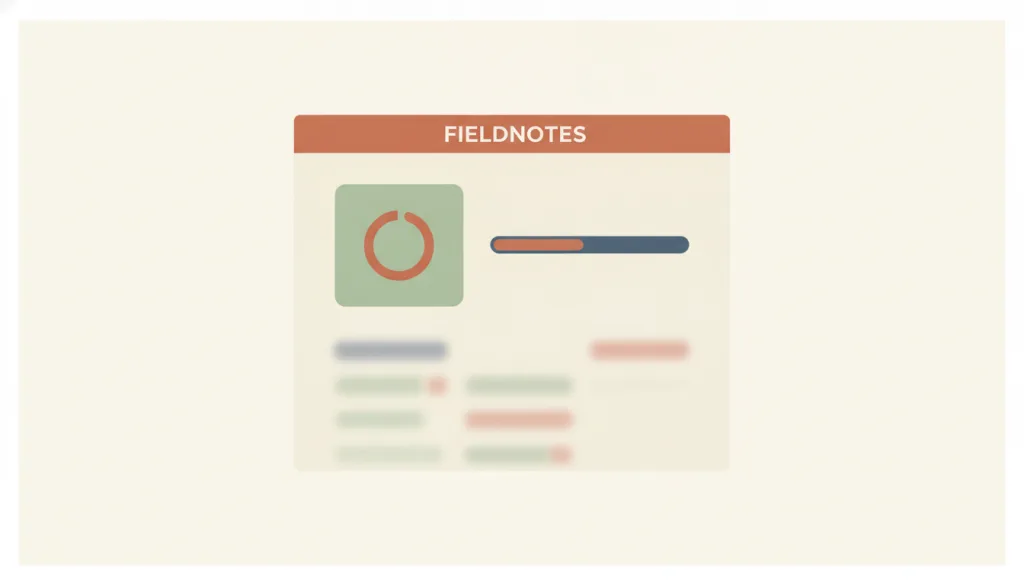
Illustration · Editorial artwork, no interactive specimen yet
On a fictional FIELDNOTES panel, a circular spinner and a looping indeterminate bar appear side by side showing no percentage number, with the content area beneath dimmed to signal waiting.

Recognizing it

  • A spinning icon or a looping bar plays continuously, showing no number or percentage
  • It only conveys that work is in progress; the animation itself does not correspond to any calculable completed amount
  • It is replaced immediately by the result, content, or an error once processing ends, rather than lingering

Concept boundary

An indeterminate progress indicator only answers whether the system is still working, not how much is done or how long is left; once a reliable completed amount and total are available, switch to a determinate progress bar instead — the two are not interchangeable, and a spinner must not be used to hide progress that could in fact be quantified. A skeleton screen is for when the content structure is known and only that structure is waiting to be filled; an indeterminate indicator is for when the completion fraction itself is unknown, or the wait covers the whole interface rather than a known structure.

When to consider it

  • The system cannot obtain a reliable completed amount or total
  • The wait is expected to exceed about 1 second, and users need to see that the system is still responding rather than stuck
  • The wait may exceed about 10 seconds, so text guidance or a way to cancel is needed alongside the animation to keep users oriented

When to be cautious

  • A real completed amount and total are already available, yet a vaguer spinner is used instead of switching to a determinate progress bar
  • An animation that fills at a steady or accelerating pace is used to fake real progress, leading users to believe they are seeing a percentage
  • The content structure is already known and only waiting to be filled in (use a skeleton screen instead)

Tradeoff

A spinner or looping animation is simple to implement and avoids any false sense of precision, but once a wait passes about 10 seconds users lose patience and orientation; it still needs text guidance or a cancel option and cannot carry the waiting experience on animation alone.

Conditional rules · Editorial advice

When A reliable completed amount or total is not availableMustDo not show a fabricated percentage, and do not use a steady or accelerating animation that makes indeterminate progress look like it is being precisely measured.
When Reduced motion is enabledMustDowngrade the spinning or looping animation to a static but still recognizable "processing" style, and keep a text status that is independent of the animation.
When The wait may exceed about 10 secondsRecommendedAdd text guidance or a way to cancel so users can stay oriented, rather than relying on the looping animation alone.

Related entries

Determinate Progress Bar ↗Conditional alternative · Choosing how to present waiting feedback

When a reliable completed amount and total exist, switch to a determinate progress bar; an indeterminate indicator must not stand in for it to imply precise progress, so the two are chosen based on measurability.

Skeleton Screen ↗Conditional alternative · Deciding what to show during the wait

Use a skeleton screen when the content structure is known and only waiting to be filled; use an indeterminate indicator when the content structure is unknown or the wait covers the whole interface.

Status Message ↗Works with · Processing ends or fails

An indeterminate indicator only shows that the process is ongoing; the result, error, or next step once it ends is left to a status message to report.

Sources and what they support

Nielsen Norman Group · Progress Indicators Make a Slow System Less Insufferable ↗

This article recommends reserving looping indeterminate indicators for waits of roughly 2 to 10 seconds, and switching to a determinate indicator that shows completion percentage once a wait exceeds 10 seconds.

Retrieved: 2026-09-15 · Archived 2026-09-16
Nielsen Norman Group · Response Times: The 3 Important Limits ↗

This article sets out three response-time limits of 0.1, 1, and 10 seconds: within about 1 second a user's train of thought stays uninterrupted, and beyond about 10 seconds users struggle to keep their attention on the task, so progress feedback and a way to interrupt the process become necessary.

Retrieved: 2026-09-15 · Archived 2026-09-16
MDN · <progress> ↗

MDN explains that omitting the value attribute makes a progress element indeterminate, indicating that an activity is ongoing with no indication of how long it is expected to take.

Retrieved: 2026-09-15 · Archived 2026-09-16
W3C WAI · Understanding SC 2.2.2 Pause, Stop, Hide ↗

This criterion requires that moving content which starts automatically, runs alongside other content, and lasts more than 5 seconds provide a way to pause, stop, or hide it; the page uses a "loading" animation shown during a download as an example, noting that if the animation is not presented in parallel with other interactive content it can be treated as essential motion and does not need such a control.

Retrieved: 2026-09-15 · Snapshot unconfirmed

Definitions reference these sources. Digital specimens, selection advice, relationships, and recipes are editorial work and have not been validated through user research.

Type extensions and implementation notes

This entry has no operable specimen yet; the illustration is an editorial sketch. When applied to a product, still verify: whether the looping animation downgrades to a static but recognizable state under reduced motion, whether a text or semantic status independent of the animation can be announced by screen readers, and whether waits beyond about 10 seconds are supplemented with guidance or a cancel option to keep users oriented.

{
  "states": [
    "idle",
    "indeterminate",
    "success",
    "error"
  ],
  "a11y": [
    "The container is marked busy and provides a text status independent of the animation, so information does not depend on the visual animation alone",
    "Avoid having screen readers interrupted repeatedly and meaninglessly by the animation itself"
  ],
  "motion": "Loops a spinning or scrolling animation by default; switches to a static but still recognizable processing style when reduced motion is enabled"
}
Full Agent entry JSON
{
  "id": "indeterminate-progress",
  "type": "micro",
  "name": {
    "zh": "不确定进度指示",
    "en": "Indeterminate Progress Indicator"
  },
  "aliases": [
    "Spinner",
    "Loading Indicator",
    "加载动画"
  ],
  "granularity": "state",
  "intents": [
    "wait-for-content"
  ],
  "tags": [
    "loading",
    "unknown progress",
    "spinner",
    "looping animation",
    "indeterminate"
  ],
  "definition": "When remaining time or completed fraction cannot be known, a continuously spinning icon or looping bar shows that the system is still working, without reporting how much has actually been done.",
  "boundary": "An indeterminate progress indicator only answers whether the system is still working, not how much is done or how long is left; once a reliable completed amount and total are available, switch to a determinate progress bar instead — the two are not interchangeable, and a spinner must not be used to hide progress that could in fact be quantified. A skeleton screen is for when the content structure is known and only that structure is waiting to be filled; an indeterminate indicator is for when the completion fraction itself is unknown, or the wait covers the whole interface rather than a known structure.",
  "signature": [
    "A spinning icon or a looping bar plays continuously, showing no number or percentage",
    "It only conveys that work is in progress; the animation itself does not correspond to any calculable completed amount",
    "It is replaced immediately by the result, content, or an error once processing ends, rather than lingering"
  ],
  "when": [
    "The system cannot obtain a reliable completed amount or total",
    "The wait is expected to exceed about 1 second, and users need to see that the system is still responding rather than stuck",
    "The wait may exceed about 10 seconds, so text guidance or a way to cancel is needed alongside the animation to keep users oriented"
  ],
  "when_not": [
    "A real completed amount and total are already available, yet a vaguer spinner is used instead of switching to a determinate progress bar",
    "An animation that fills at a steady or accelerating pace is used to fake real progress, leading users to believe they are seeing a percentage",
    "The content structure is already known and only waiting to be filled in (use a skeleton screen instead)"
  ],
  "tradeoff": "A spinner or looping animation is simple to implement and avoids any false sense of precision, but once a wait passes about 10 seconds users lose patience and orientation; it still needs text guidance or a cancel option and cannot carry the waiting experience on animation alone.",
  "comparison": {
    "focus": "Tells users the system is still working, but not how much has been done",
    "mechanism": "A looping spinner or bar animation that does not correspond to any value",
    "cost": "Cannot convey remaining time; a long wait still needs extra text guidance or a cancel mechanism"
  },
  "sources": [
    {
      "id": "nng-progress-indicators",
      "title": "Nielsen Norman Group · Progress Indicators Make a Slow System Less Insufferable",
      "url": "https://www.nngroup.com/articles/progress-indicators/",
      "claim": "This article recommends reserving looping indeterminate indicators for waits of roughly 2 to 10 seconds, and switching to a determinate indicator that shows completion percentage once a wait exceeds 10 seconds.",
      "checkedAt": "2026-09-15",
      "archive": {
        "lookupUrl": "https://web.archive.org/web/20260915*/https://www.nngroup.com/articles/progress-indicators/",
        "status": "available",
        "checkedAt": "2026-09-16T05:46:58.176Z",
        "jobId": "spn2-9f1cb6ee0ec1afcc2efcbc9c16a74dd503faf511",
        "url": "https://web.archive.org/web/20260916054722/https://www.nngroup.com/articles/progress-indicators/",
        "timestamp": "20260916054722"
      }
    },
    {
      "id": "nng-response-times",
      "title": "Nielsen Norman Group · Response Times: The 3 Important Limits",
      "url": "https://www.nngroup.com/articles/response-times-3-important-limits/",
      "claim": "This article sets out three response-time limits of 0.1, 1, and 10 seconds: within about 1 second a user's train of thought stays uninterrupted, and beyond about 10 seconds users struggle to keep their attention on the task, so progress feedback and a way to interrupt the process become necessary.",
      "checkedAt": "2026-09-15",
      "archive": {
        "lookupUrl": "https://web.archive.org/web/20260915*/https://www.nngroup.com/articles/response-times-3-important-limits/",
        "status": "available",
        "checkedAt": "2026-09-16T03:50:36.309Z",
        "jobId": "spn2-a445b35eeb0d266caa0107c5f3694ef90bec60e8",
        "url": "https://web.archive.org/web/20260916035201/https://www.nngroup.com/articles/response-times-3-important-limits/",
        "timestamp": "20260916035201"
      }
    },
    {
      "id": "mdn-progress-element",
      "title": "MDN · <progress>",
      "url": "https://developer.mozilla.org/en-US/docs/Web/HTML/Element/progress",
      "claim": "MDN explains that omitting the value attribute makes a progress element indeterminate, indicating that an activity is ongoing with no indication of how long it is expected to take.",
      "checkedAt": "2026-09-15",
      "archive": {
        "lookupUrl": "https://web.archive.org/web/20260915*/https://developer.mozilla.org/en-US/docs/Web/HTML/Element/progress",
        "status": "available",
        "checkedAt": "2026-09-16T04:07:05.492Z",
        "jobId": "spn2-eda5b33b36bb07caa933987d49748602f928cb5f",
        "url": "https://web.archive.org/web/20260916040819/https://developer.mozilla.org/en-US/docs/Web/HTML/Reference/Elements/progress",
        "timestamp": "20260916040819"
      }
    },
    {
      "id": "wcag22-pause-stop-hide",
      "title": "W3C WAI · Understanding SC 2.2.2 Pause, Stop, Hide",
      "url": "https://www.w3.org/WAI/WCAG22/Understanding/pause-stop-hide.html",
      "claim": "This criterion requires that moving content which starts automatically, runs alongside other content, and lasts more than 5 seconds provide a way to pause, stop, or hide it; the page uses a \"loading\" animation shown during a download as an example, noting that if the animation is not presented in parallel with other interactive content it can be treated as essential motion and does not need such a control.",
      "checkedAt": "2026-09-15",
      "archive": {
        "lookupUrl": "https://web.archive.org/web/20260915*/https://www.w3.org/WAI/WCAG22/Understanding/pause-stop-hide.html",
        "status": "pending",
        "checkedAt": "2026-09-16T04:07:05.881Z",
        "error": "status-request-failed",
        "jobId": "spn2-f87881b95ff0174bd8037945300fdad38de222d4"
      }
    }
  ],
  "relations": [
    {
      "target": "determinate-progress",
      "kind": "alternative",
      "condition": "Choosing how to present waiting feedback",
      "reason": "When a reliable completed amount and total exist, switch to a determinate progress bar; an indeterminate indicator must not stand in for it to imply precise progress, so the two are chosen based on measurability.",
      "basis": "editorial"
    },
    {
      "target": "skeleton",
      "kind": "alternative",
      "condition": "Deciding what to show during the wait",
      "reason": "Use a skeleton screen when the content structure is known and only waiting to be filled; use an indeterminate indicator when the content structure is unknown or the wait covers the whole interface.",
      "basis": "editorial"
    },
    {
      "target": "status-message",
      "kind": "composes_with",
      "condition": "Processing ends or fails",
      "reason": "An indeterminate indicator only shows that the process is ongoing; the result, error, or next step once it ends is left to a status message to report.",
      "basis": "editorial"
    }
  ],
  "rules": [
    {
      "when": "A reliable completed amount or total is not available",
      "instruction": "Do not show a fabricated percentage, and do not use a steady or accelerating animation that makes indeterminate progress look like it is being precisely measured.",
      "strength": "must",
      "basis": "editorial"
    },
    {
      "when": "Reduced motion is enabled",
      "instruction": "Downgrade the spinning or looping animation to a static but still recognizable \"processing\" style, and keep a text status that is independent of the animation.",
      "strength": "must",
      "basis": "editorial"
    },
    {
      "when": "The wait may exceed about 10 seconds",
      "instruction": "Add text guidance or a way to cancel so users can stay oriented, rather than relying on the looping animation alone.",
      "strength": "recommend",
      "basis": "editorial"
    }
  ],
  "requirements": [],
  "behavior": {
    "states": [
      "idle",
      "indeterminate",
      "success",
      "error"
    ],
    "a11y": [
      "The container is marked busy and provides a text status independent of the animation, so information does not depend on the visual animation alone",
      "Avoid having screen readers interrupted repeatedly and meaninglessly by the animation itself"
    ],
    "motion": "Loops a spinning or scrolling animation by default; switches to a static but still recognizable processing style when reduced motion is enabled"
  },
  "demo": null,
  "version": "0.1.0",
  "editorialStatus": "drafted",
  "demoCapabilities": [],
  "implementationNote": "This entry has no operable specimen yet; the illustration is an editorial sketch. When applied to a product, still verify: whether the looping animation downgrades to a static but recognizable state under reduced motion, whether a text or semantic status independent of the animation can be announced by screen readers, and whether waits beyond about 10 seconds are supplemented with guidance or a cancel option to keep users oriented.",
  "image": {
    "src": "/images/indeterminate-progress.webp",
    "alt": "On a fictional FIELDNOTES panel, a circular spinner and a looping indeterminate bar appear side by side showing no percentage number, with the content area beneath dimmed to signal waiting."
  },
  "searchTerms": [
    "加载中",
    "未知进度",
    "旋转图标",
    "循环动画",
    "不确定"
  ]
}