VOCABULARY / ENTRY
Infinite Scroll
infinite-scroll
A list that automatically loads and appends the next batch of content as the user scrolls near its end, with no click to turn the page, so it looks like one continuous stream with no end.
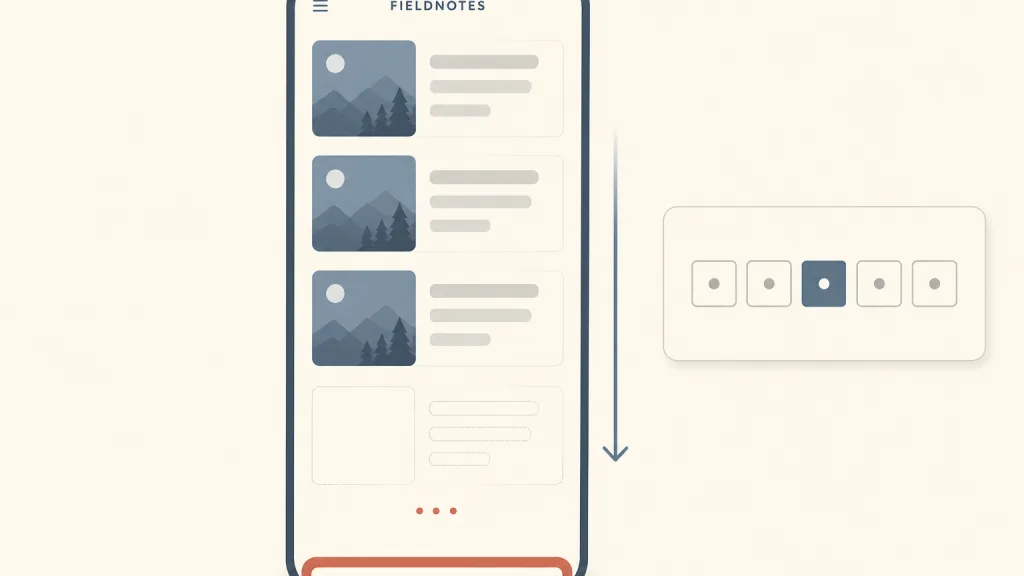
Recognizing it
- The next batch is appended automatically near the end of the list, with no click
- There are no page numbers and no stable “page N” position
- A loading state appears at the end of the list while new content arrives
Concept boundary
What separates infinite scroll from pagination is whether there are stable page boundaries: pagination cuts results into numbered pages, so a user can say “on page three” and go back there; infinite scroll has only one ever-growing list with no notion of a page number. A “Load more” button sits between the two: it also appends content, but every batch takes a deliberate click, so the footer stays reachable and nobody is misled into thinking the list has ended. This entry means only the automatic form. Nor is it a rendering optimisation such as list virtualisation, which concerns rendering only the items in view and says nothing about when content loads or whether the user can find their place. Whether infinite scroll makes people unable to stop is not stated here as fact; it appears only as editorial opinion in the trade-off.
When to consider it
- Items are homogeneous and the user has no specific goal, just browsing, as in a news or image feed
- Use is mostly on phones, where people already scroll continuously
- The order of the list matters little and users rarely need to return to one particular item
When to be cautious
- Users look for a specific item, or compare items that sit far apart in a long list
- The footer holds links or information that users actually need
- Users often open a detail view and come back, and the list cannot restore their position
- Many users are on low-bandwidth connections or rely on the keyboard and screen readers
Tradeoff
Infinite scroll removes the click and wait of turning pages, so browsing is not interrupted; the cost is a lost sense of place — it is hard to remember where an item was or to get back to it, the footer becomes unreachable, and users may think they have seen everything before the next batch appears. Some commentators also argue that a list without an end lengthens time on the page; that is editorial opinion, and this entry’s sources offer no evidence for it.
Conditional rules · Editorial advice
Related entries
Pagination gives stable page boundaries that make finding and revisiting easy; infinite scroll drops the page-turning step in exchange for uninterrupted browsing. Users looking for a specific item favour pagination, casual browsers favour infinite scroll.
A skeleton placeholder at the end of the list tells users more content is on its way and makes them less likely to think they have reached the end.
Every time the list nears its end it appends more, pushing the footer away for good; use Load More instead, or move the footer information elsewhere.
Infinite scroll is poor at locating things; search and filters let users with a clear goal skip scrolling item by item.
Sources and what they support
The article defines infinite scrolling as a listing approach that loads content continuously as the user scrolls down, removing the need for pagination. The problems it lists include difficulty remembering and returning to an item, the illusion of having reached the end, an unreachable footer, accessibility problems for keyboard and screen-reader users, load performance and search-engine crawling. It advises avoiding infinite scrolling when users need to find a specific item, compare items spread across a long list, or review only the top results, suggests saving the list position for users returning from a detail page, and suggests Load More when the footer matters. This entry’s definition, conditions of use and comparison with pagination and Load More are paraphrased from it.
Retrieved: 2026-10-20 · Snapshot unconfirmedThe pattern describes a feed as a page section that automatically loads new sections of content as the user scrolls, often appearing as a list of articles that seems to scroll infinitely, and notes that scroll-triggered loading can cause usability and interoperability problems for assistive-technology users. It advises setting aria-busy to true while several articles are added or removed and, crucially, back to false when done, and gives keyboard conventions such as Page Down / Page Up to move focus between articles and Control + End to move to the first focusable element after the feed. This entry’s accessibility requirements are paraphrased from it.
Retrieved: 2026-10-20 · Snapshot unconfirmedDefinitions reference these sources. Digital specimens, selection advice, relationships, and recipes are editorial work and have not been validated through user research.
Type extensions and implementation notes
This entry has no runnable specimen; the illustration is an editorial sketch of new cards being appended and a loading state at the end of a list, set against numbered pagination, not a verified implementation. Before applying it to a product, test position restoration on return, the keyboard way out of the list, and how screen readers announce new content.
{
  "states": [
    "idle",
    "loading-more",
    "appended",
    "end-of-list",
    "error"
  ],
  "a11y": [
    "Appending new items does not steal the current focus, and screen-reader users can tell the list is updating",
    "Keyboard users can move between items and jump past the list in one step",
    "A failed load offers a way to retry instead of silently stopping"
  ],
  "motion": "New content appears at the end directly, without shifting items already on screen"
}
Open the Agent JSON file for this entryThis file repeats every field of this entry verbatim and adds its sources, archive status, and editorial scope.