Design VocabularyDesign vocabulary · Edition 01

VOCABULARY / ENTRY

Supporting-Pane Layout

supporting-pane

Add to comparison +

Keep a narrower supporting pane beside a wider main content column to show reference material, citations, or the source excerpts a generated response is based on; the pane's content changes with the main content itself, not because someone selected an item in a list — unlike the selection link in master-detail. A common variant is the "Aligned Sidebar": citations or sources shown alongside the body copy to help people verify it.
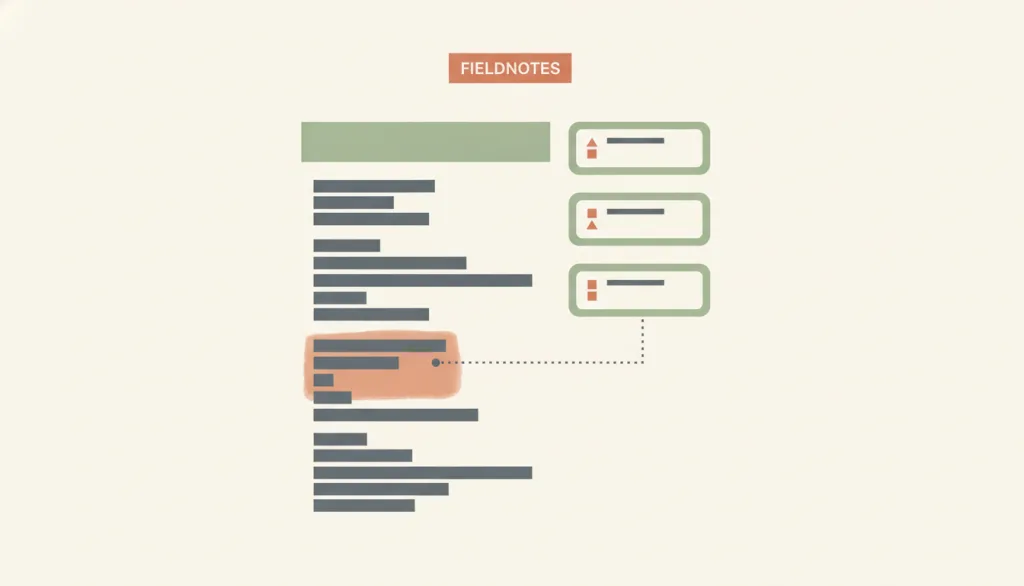
Illustration · Editorial artwork, no interactive specimen yet
A fictional FIELDNOTES app screen: a wider main content column on the left and a narrower supporting pane on the right showing a few reference excerpts; a faint line connects one excerpt to a highlighted passage in the main content, rendered in a flat, muted warm illustration style.

Recognizing it

  • The main content takes a wider column, with the supporting pane occupying a narrower width beside it
  • The supporting pane's content changes with the current task, passage, or generated result, not with a list selection
  • An explicit link between the main content and the pane's items (a highlight, a connecting line, or a number), not just their side-by-side position

Concept boundary

A supporting pane and master-detail both show a main area plus a secondary area, but in master-detail selecting an item in the side list drives the detail content. A supporting pane's content follows the current task, passage, or generated result instead, with no object-selection step. It also differs from a sidebar layout: a sidebar is a persistent navigation or tool region that stays largely unchanged across pages, while a supporting pane is tightly coupled to the current main content and typically focuses on reference material, citations, or sources rather than site-level navigation. The "Aligned Sidebar" pattern, which shows citations aligned beside the body copy, is a presentation variant of the supporting pane rather than a separate layout.

When to consider it

  • People need to check the corresponding reference material, citation, or source while reading or verifying content
  • Supporting information must stay visible while people work on the main task, but that information is not obtained by selecting a list item
  • The content is generative or citation-dense, and people need room to verify it in depth

When to be cautious

  • The supporting content should really be determined by an item selected in a list — design that as master-detail instead
  • The supporting pane would become the only way to complete a required task; essential actions should not live there exclusively
  • The screen is too narrow for the pane and the product has no reachable way to collapse or reopen it

Tradeoff

Reference material or sources stay visible and easy to verify, but the pane takes up horizontal space from the main content; on narrow screens it must collapse to a reachable entry point rather than disappear outright, and the link between main content and pane items needs an extra visual cue to stay legible, or people will tend to overlook it.

Conditional rules · Editorial advice

When The supporting pane holds an action or piece of information required to complete the main taskMustAlso provide that action or information in the main content area, or through a path that does not depend on the supporting pane, so no required function lives only in the pane.
When The viewport is too narrow to show the main content and supporting pane side by sideRecommendedLet the pane collapse into a reachable entry point (a drawer, tab, or button) with a text label, rather than letting the supporting content simply disappear.
When The supporting pane shows citations, sources, or passages that correspond to the main contentRecommendedMark the correspondence between the main content and the pane's items explicitly, with numbering, highlighting, or explanatory text, rather than relying only on side-by-side position to imply the link.

Related entries

Master–Detail ↗Related, but different · Deciding whether the supporting content is driven by a list selection

Both show a main area plus a secondary area, but in master-detail the side list's selection drives the detail content; a supporting pane's content follows the current task or generated result without an object-selection step.

Sidebar Layout ↗Related, but different · Deciding whether the region is a persistent cross-page region or information tied to the current main content

A sidebar layout keeps its position and content largely unchanged across pages as navigation or tools; a supporting pane is tightly coupled to the current main content, changing with the task or generated result, and typically focuses on citations, sources, or supporting evidence rather than site-level navigation.

Progressive Disclosure ↗Works with · The viewport is too narrow to show the main content and supporting pane side by side

The supporting pane can collapse into an on-demand drawer, tab, or button so reference content does not disappear entirely on narrow screens, while keeping a reachable entry point.

Sources and what they support

Nielsen Norman Group · Fight Against "Right-Rail Blindness" ↗

Reports that people develop a banner-blindness-like avoidance of side-rail or right-rail content, so a side pane should carry only secondary, supporting content; essential content and actions people must complete should not live only in that pane, which works better as a supplementary "customer-service" role than as primary navigation or the sole holder of critical information.

Retrieved: 2026-09-15 · Archived 2026-09-16
arXiv preprint (2601.14611) · Seeing to Think? How Source Transparency Design Shapes Interactive Information Seeking and Evaluation in Conversational AI ↗

This preprint (submitted 2026-01-21, not yet peer-reviewed) compares four ways of presenting sources; its abstract reports that an "Aligned Sidebar" showing citations aligned with the generated content mitigated the negative effects of rising citation density, with users of that condition showing significantly higher critical-thinking and synthesis scores; because it has not been peer-reviewed, this finding is used only as editorial support for the aligned-source-sidebar variant, not as an established fact.

Retrieved: 2026-09-15 · Archived 2026-09-16

Definitions reference these sources. Digital specimens, selection advice, relationships, and recipes are editorial work and have not been validated through user research.

Type extensions and implementation notes

No operable specimen yet; the illustration is an editorial sketch. When applied to a product, still verify: whether the supporting pane holds any required action or information that has no other path, whether the collapsed-state entry point stays reachable and labeled on narrow screens, whether the link between main content and pane items is perceivable to assistive technology, and whether the "aligned source sidebar" variant stays readable — and is not overlooked — as citation density rises.

{
  "states": [
    "expanded",
    "collapsed",
    "drawer"
  ],
  "a11y": [
    "Beyond color highlighting, the correspondence between main content and supporting-pane items should also carry a text or structural marker, such as a number or caption",
    "When the pane's content changes with the task, it should not steal focus order or screen-reader reading order away from the main content",
    "In the collapsed state, the expand control has a text name and is keyboard operable"
  ],
  "motion": "Expanding or collapsing the pane may use a brief transition and should respect the reduced-motion preference"
}
Full Agent entry JSON
{
  "id": "supporting-pane",
  "type": "layout",
  "name": {
    "zh": "辅助面板布局",
    "en": "Supporting-Pane Layout"
  },
  "aliases": [
    "辅助面板",
    "Supporting Pane",
    "Aligned Sidebar"
  ],
  "granularity": "page",
  "intents": [
    "organize-content",
    "consult-reference"
  ],
  "tags": [
    "supporting pane",
    "reference content",
    "split view",
    "source sidebar",
    "page layout"
  ],
  "definition": "Keep a narrower supporting pane beside a wider main content column to show reference material, citations, or the source excerpts a generated response is based on; the pane's content changes with the main content itself, not because someone selected an item in a list — unlike the selection link in master-detail. A common variant is the \"Aligned Sidebar\": citations or sources shown alongside the body copy to help people verify it.",
  "boundary": "A supporting pane and master-detail both show a main area plus a secondary area, but in master-detail selecting an item in the side list drives the detail content. A supporting pane's content follows the current task, passage, or generated result instead, with no object-selection step. It also differs from a sidebar layout: a sidebar is a persistent navigation or tool region that stays largely unchanged across pages, while a supporting pane is tightly coupled to the current main content and typically focuses on reference material, citations, or sources rather than site-level navigation. The \"Aligned Sidebar\" pattern, which shows citations aligned beside the body copy, is a presentation variant of the supporting pane rather than a separate layout.",
  "signature": [
    "The main content takes a wider column, with the supporting pane occupying a narrower width beside it",
    "The supporting pane's content changes with the current task, passage, or generated result, not with a list selection",
    "An explicit link between the main content and the pane's items (a highlight, a connecting line, or a number), not just their side-by-side position"
  ],
  "when": [
    "People need to check the corresponding reference material, citation, or source while reading or verifying content",
    "Supporting information must stay visible while people work on the main task, but that information is not obtained by selecting a list item",
    "The content is generative or citation-dense, and people need room to verify it in depth"
  ],
  "when_not": [
    "The supporting content should really be determined by an item selected in a list — design that as master-detail instead",
    "The supporting pane would become the only way to complete a required task; essential actions should not live there exclusively",
    "The screen is too narrow for the pane and the product has no reachable way to collapse or reopen it"
  ],
  "tradeoff": "Reference material or sources stay visible and easy to verify, but the pane takes up horizontal space from the main content; on narrow screens it must collapse to a reachable entry point rather than disappear outright, and the link between main content and pane items needs an extra visual cue to stay legible, or people will tend to overlook it.",
  "comparison": {
    "focus": "Keeping reference or supporting information visible and checkable while browsing the main content",
    "mechanism": "A narrower pane placed beside the main content, not driven by list selection, with an explicit link between pane items and main content",
    "cost": "Consumes horizontal space, needs a reachable collapsed state on narrow screens, and requires maintaining a legible link marker"
  },
  "sources": [
    {
      "id": "supporting-pane-nng-right-rail",
      "title": "Nielsen Norman Group · Fight Against \"Right-Rail Blindness\"",
      "url": "https://www.nngroup.com/articles/fight-right-rail-blindness/",
      "claim": "Reports that people develop a banner-blindness-like avoidance of side-rail or right-rail content, so a side pane should carry only secondary, supporting content; essential content and actions people must complete should not live only in that pane, which works better as a supplementary \"customer-service\" role than as primary navigation or the sole holder of critical information.",
      "checkedAt": "2026-09-15",
      "archive": {
        "lookupUrl": "https://web.archive.org/web/20260915*/https://www.nngroup.com/articles/fight-right-rail-blindness/",
        "status": "available",
        "checkedAt": "2026-09-16T04:27:22.005Z",
        "jobId": "spn2-0471fc9d28ae899ed3a9f639dbf21f9c60f661d7",
        "url": "https://web.archive.org/web/20260916042832/https://www.nngroup.com/articles/fight-right-rail-blindness/",
        "timestamp": "20260916042832"
      }
    },
    {
      "id": "supporting-pane-arxiv-source-transparency",
      "title": "arXiv preprint (2601.14611) · Seeing to Think? How Source Transparency Design Shapes Interactive Information Seeking and Evaluation in Conversational AI",
      "url": "https://arxiv.org/abs/2601.14611",
      "claim": "This preprint (submitted 2026-01-21, not yet peer-reviewed) compares four ways of presenting sources; its abstract reports that an \"Aligned Sidebar\" showing citations aligned with the generated content mitigated the negative effects of rising citation density, with users of that condition showing significantly higher critical-thinking and synthesis scores; because it has not been peer-reviewed, this finding is used only as editorial support for the aligned-source-sidebar variant, not as an established fact.",
      "checkedAt": "2026-09-15",
      "archive": {
        "lookupUrl": "https://web.archive.org/web/20260915*/https://arxiv.org/abs/2601.14611",
        "status": "available",
        "checkedAt": "2026-09-16T04:27:22.464Z",
        "jobId": "spn2-faeadc21fa1a6f55dc59856e2043d40785f16f4b",
        "url": "https://web.archive.org/web/20260916042836/https://arxiv.org/abs/2601.14611",
        "timestamp": "20260916042836"
      }
    }
  ],
  "relations": [
    {
      "target": "master-detail",
      "kind": "related",
      "condition": "Deciding whether the supporting content is driven by a list selection",
      "reason": "Both show a main area plus a secondary area, but in master-detail the side list's selection drives the detail content; a supporting pane's content follows the current task or generated result without an object-selection step.",
      "basis": "editorial"
    },
    {
      "target": "sidebar-layout",
      "kind": "related",
      "condition": "Deciding whether the region is a persistent cross-page region or information tied to the current main content",
      "reason": "A sidebar layout keeps its position and content largely unchanged across pages as navigation or tools; a supporting pane is tightly coupled to the current main content, changing with the task or generated result, and typically focuses on citations, sources, or supporting evidence rather than site-level navigation.",
      "basis": "editorial"
    },
    {
      "target": "progressive-disclosure",
      "kind": "composes_with",
      "condition": "The viewport is too narrow to show the main content and supporting pane side by side",
      "reason": "The supporting pane can collapse into an on-demand drawer, tab, or button so reference content does not disappear entirely on narrow screens, while keeping a reachable entry point.",
      "basis": "editorial"
    }
  ],
  "rules": [
    {
      "when": "The supporting pane holds an action or piece of information required to complete the main task",
      "instruction": "Also provide that action or information in the main content area, or through a path that does not depend on the supporting pane, so no required function lives only in the pane.",
      "strength": "must",
      "basis": "editorial"
    },
    {
      "when": "The viewport is too narrow to show the main content and supporting pane side by side",
      "instruction": "Let the pane collapse into a reachable entry point (a drawer, tab, or button) with a text label, rather than letting the supporting content simply disappear.",
      "strength": "recommend",
      "basis": "editorial"
    },
    {
      "when": "The supporting pane shows citations, sources, or passages that correspond to the main content",
      "instruction": "Mark the correspondence between the main content and the pane's items explicitly, with numbering, highlighting, or explanatory text, rather than relying only on side-by-side position to imply the link.",
      "strength": "recommend",
      "basis": "editorial"
    }
  ],
  "behavior": {
    "states": [
      "expanded",
      "collapsed",
      "drawer"
    ],
    "a11y": [
      "Beyond color highlighting, the correspondence between main content and supporting-pane items should also carry a text or structural marker, such as a number or caption",
      "When the pane's content changes with the task, it should not steal focus order or screen-reader reading order away from the main content",
      "In the collapsed state, the expand control has a text name and is keyboard operable"
    ],
    "motion": "Expanding or collapsing the pane may use a brief transition and should respect the reduced-motion preference"
  },
  "demo": null,
  "version": "0.1.0",
  "editorialStatus": "drafted",
  "requirements": [],
  "demoCapabilities": [],
  "implementationNote": "No operable specimen yet; the illustration is an editorial sketch. When applied to a product, still verify: whether the supporting pane holds any required action or information that has no other path, whether the collapsed-state entry point stays reachable and labeled on narrow screens, whether the link between main content and pane items is perceivable to assistive technology, and whether the \"aligned source sidebar\" variant stays readable — and is not overlooked — as citation density rises.",
  "image": {
    "src": "/images/supporting-pane.webp",
    "alt": "A fictional FIELDNOTES app screen: a wider main content column on the left and a narrower supporting pane on the right showing a few reference excerpts; a faint line connects one excerpt to a highlighted passage in the main content, rendered in a flat, muted warm illustration style."
  },
  "searchTerms": [
    "辅助面板",
    "参考内容",
    "分栏",
    "来源侧栏",
    "页面级布局"
  ]
}