Design VocabularyDesign vocabulary · Edition 01

VOCABULARY / ENTRY

Conversation-and-Workspace Layout

conversation-workspace

Add to comparison +

A page layout that places a conversation pane beside a workspace pane holding a persistent artifact: the workspace stores the object the conversation produces or modifies (a document, code, a board), and the conversation is the means of changing that object, not the object itself.
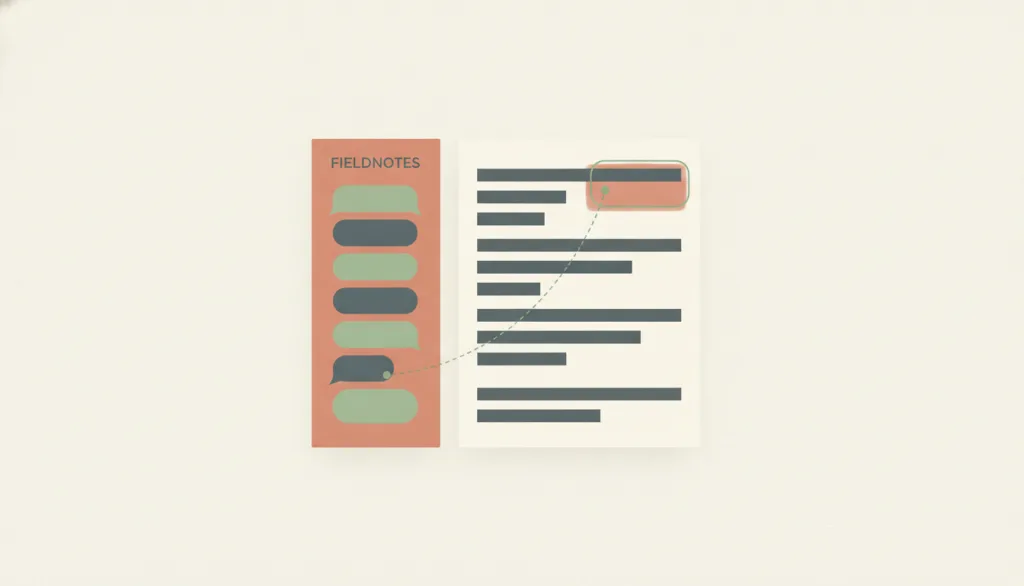
Illustration · Editorial artwork, no interactive specimen yet
A fictional FIELDNOTES two-pane screen: a narrower left column of conversation message bubbles, and a wider right workspace panel showing a document with one recently changed block highlighted; a faint line connects the latest message to that highlighted block, rendered in a flat, muted warm palette.

Recognizing it

  • One side is a conversation message stream; the other is a workspace pane holding a persistent artifact
  • Messages sent in the conversation produce visible, locatable changes in the workspace
  • Every workspace change can be traced back to the specific conversation turn that produced it

Concept boundary

It differs from master-detail in what drives the second region's content: in master-detail, the detail content is determined by which item the user selects from a list; here, the workspace changes because the user sent a message, not because they selected an item from a list. It differs from supporting-pane in which side holds the primary task: in supporting-pane, the main content area is itself the primary task and the side pane only offers reference material or sources; here, the workspace pane holds the durable object the user actually wants to keep and deliver, and the conversation pane is only the means of changing it, even when the conversation occupies a large share of the screen. How the turn-taking conversation itself is organized, and how capability limits are disclosed, belongs to conversational interface; this entry only covers the spatial pairing of the two panes and the sync contract between them, not how conversation turns are presented.

When to consider it

  • People need to keep generating or modifying a document, codebase, or board through conversational instructions, and that artifact needs to be retained and delivered
  • People need to inspect or directly edit the artifact's current state at any time while still reviewing the conversation history
  • The artifact goes through many rounds of iterative changes, and people need to tell which turn caused which change

When to be cautious

  • The conversation's output is itself the final deliverable, with no separate workspace object that needs to persist beyond the conversation; a plain conversational interface is enough
  • The second region's content is actually determined by which item the user selects from a list rather than by sending a message; that is master-detail
  • The viewport is too narrow to keep an accessible entry point to the workspace, and the product removes access to it entirely instead of collapsing it into a reachable control

Tradeoff

People can watch the artifact update in step with the conversation and switch less often between the two, but the product must maintain and surface a visible mapping between messages and changes; narrow screens force a tradeoff between the two panes; and if the workspace cannot be edited directly without going through the conversation, even a small edit is forced into a conversational detour.

Conditional rules · Editorial advice

When A message in the conversation causes the workspace content to changeMustGive the changed content a recognizable marker in the workspace (such as a highlight or a note) and let people see which conversation turn produced that change.
When People want to modify the workspace contentRecommendedAllow direct editing in the workspace; do not force every change to be re-expressed as a conversation message.
When The viewport is too narrow to show the conversation pane and the workspace pane side by sideMustCollapse one side into a reachable control (such as a tab or a drawer), but keep a path to the workspace's full content directly reachable — do not let it become unreadable or unreachable once collapsed.

Related entries

Supporting-Pane Layout ↗Related, but different · Deciding which side holds the primary task: the durable object the conversation produces, or reference material

Both pair a second pane alongside the main content, but supporting-pane's main content area is itself the primary task while its pane only offers reference or sources; here the workspace pane holds the durable object people want to keep, and the conversation pane is only the means of changing it.

Master–Detail ↗Related, but different · Identifying what drives the second region's content

Both are a primary-plus-secondary spatial structure, but master-detail is driven by which item the user selects from a list, while this layout is driven by a message the user sends — the input is not a selection from a list.

Conversational Interface ↗Works with · The conversation pane still needs to organize how the turn-taking conversation itself is presented

Conversational interface owns how message turns are presented and how capability limits are disclosed; this layout adds a second, persistent workspace pane on top of that and defines the sync and traceability contract between messages and workspace changes.

Sources and what they support

Microsoft 365 Blog · Introducing a new design for Microsoft 365 Copilot ↗

Microsoft's own product design blog describes Copilot opening a conversation side pane next to a document, spreadsheet, or slide that can suggest or directly make edits to the content, and stresses giving 'clear signals' so people always know what the system is doing; this is Microsoft's description of its own product, a product-announcement article, and is cited only to show one real-world shape of a paired conversation-and-workspace layout, not as independent research evidence.

Retrieved: 2026-09-15 · Archived 2026-09-16
Nielsen Norman Group · Accordion Editing and Apple Picking: Early Generative-AI User Behaviors ↗

This research found that when people iteratively refine generated content in a purely conversational interface (alternating 'shrinking' and 'expanding', dubbed 'accordion editing'), they easily get lost in the accumulating message stream and must repeatedly scroll back up to compare changes across rounds, a friction observed with every study participant; this motivates keeping the persistent artifact in a separate, fixed workspace pane rather than burying it in conversation history, though the study examined purely conversational interfaces and did not directly test a paired-workspace design.

Retrieved: 2026-09-15 · Archived 2026-09-16

Definitions reference these sources. Digital specimens, selection advice, relationships, and recipes are editorial work and have not been validated through user research.

Type extensions and implementation notes

No operable specimen yet; the illustration is an editorial sketch to convey the layout concept, not a real product screenshot. Before shipping this in a product, still verify: whether the mapping between workspace changes and specific conversation turns stays legible with realistic data volumes and long conversations; whether the workspace genuinely supports direct editing without going through the conversation; whether both panes remain fully reachable by keyboard and screen reader after collapsing on a narrow screen; and whether change markers become visual noise under frequent edits.

{
  "states": [
    "expanded",
    "collapsed-conversation",
    "collapsed-workspace"
  ],
  "a11y": [
    "The most recent workspace change carries a text note in addition to a color highlight, not color alone",
    "A workspace update triggered by the conversation does not steal the user's current keyboard focus",
    "The expand control in a collapsed state has a text label and is keyboard-operable"
  ],
  "motion": "A brief highlight transition may mark the location of the latest workspace change, and it respects reduced-motion preferences"
}
Full Agent entry JSON
{
  "id": "conversation-workspace",
  "type": "layout",
  "name": {
    "zh": "对话与工作区并置",
    "en": "Conversation-and-Workspace Layout"
  },
  "aliases": [
    "对话工作区布局",
    "对话画布布局",
    "Chat-and-Canvas Layout"
  ],
  "granularity": "page",
  "intents": [
    "state-intent",
    "co-produce-artifact"
  ],
  "tags": [
    "conversation pane",
    "workspace",
    "paired panes",
    "synced artifact",
    "traceable changes"
  ],
  "definition": "A page layout that places a conversation pane beside a workspace pane holding a persistent artifact: the workspace stores the object the conversation produces or modifies (a document, code, a board), and the conversation is the means of changing that object, not the object itself.",
  "boundary": "It differs from master-detail in what drives the second region's content: in master-detail, the detail content is determined by which item the user selects from a list; here, the workspace changes because the user sent a message, not because they selected an item from a list. It differs from supporting-pane in which side holds the primary task: in supporting-pane, the main content area is itself the primary task and the side pane only offers reference material or sources; here, the workspace pane holds the durable object the user actually wants to keep and deliver, and the conversation pane is only the means of changing it, even when the conversation occupies a large share of the screen. How the turn-taking conversation itself is organized, and how capability limits are disclosed, belongs to conversational interface; this entry only covers the spatial pairing of the two panes and the sync contract between them, not how conversation turns are presented.",
  "signature": [
    "One side is a conversation message stream; the other is a workspace pane holding a persistent artifact",
    "Messages sent in the conversation produce visible, locatable changes in the workspace",
    "Every workspace change can be traced back to the specific conversation turn that produced it"
  ],
  "when": [
    "People need to keep generating or modifying a document, codebase, or board through conversational instructions, and that artifact needs to be retained and delivered",
    "People need to inspect or directly edit the artifact's current state at any time while still reviewing the conversation history",
    "The artifact goes through many rounds of iterative changes, and people need to tell which turn caused which change"
  ],
  "when_not": [
    "The conversation's output is itself the final deliverable, with no separate workspace object that needs to persist beyond the conversation; a plain conversational interface is enough",
    "The second region's content is actually determined by which item the user selects from a list rather than by sending a message; that is master-detail",
    "The viewport is too narrow to keep an accessible entry point to the workspace, and the product removes access to it entirely instead of collapsing it into a reachable control"
  ],
  "tradeoff": "People can watch the artifact update in step with the conversation and switch less often between the two, but the product must maintain and surface a visible mapping between messages and changes; narrow screens force a tradeoff between the two panes; and if the workspace cannot be edited directly without going through the conversation, even a small edit is forced into a conversational detour.",
  "comparison": {
    "focus": "Continuing to generate or modify a workspace artifact that must be retained, through conversation",
    "mechanism": "A conversation pane paired with a workspace pane, with a traceable mapping kept between messages and workspace changes",
    "cost": "Maintaining and displaying a message-to-change mapping; keeping a reachable entry point to the workspace on narrow screens"
  },
  "sources": [
    {
      "id": "conversation-workspace-ms-365-copilot-design",
      "title": "Microsoft 365 Blog · Introducing a new design for Microsoft 365 Copilot",
      "url": "https://www.microsoft.com/en-us/microsoft-365/blog/2026/05/28/introducing-a-new-design-for-microsoft-365-copilot/",
      "claim": "Microsoft's own product design blog describes Copilot opening a conversation side pane next to a document, spreadsheet, or slide that can suggest or directly make edits to the content, and stresses giving 'clear signals' so people always know what the system is doing; this is Microsoft's description of its own product, a product-announcement article, and is cited only to show one real-world shape of a paired conversation-and-workspace layout, not as independent research evidence.",
      "checkedAt": "2026-09-15",
      "archive": {
        "lookupUrl": "https://web.archive.org/web/20260915*/https://www.microsoft.com/en-us/microsoft-365/blog/2026/05/28/introducing-a-new-design-for-microsoft-365-copilot/",
        "status": "available",
        "checkedAt": "2026-09-16T05:40:54.379Z",
        "jobId": "spn2-5c967b1cf4e564d75e20df084d0d9e7a570100a1",
        "url": "https://web.archive.org/web/20260916054120/https://www.microsoft.com/en-us/microsoft-365/blog/2026/05/28/introducing-a-new-design-for-microsoft-365-copilot/",
        "timestamp": "20260916054120"
      }
    },
    {
      "id": "conversation-workspace-nng-accordion-editing",
      "title": "Nielsen Norman Group · Accordion Editing and Apple Picking: Early Generative-AI User Behaviors",
      "url": "https://www.nngroup.com/articles/accordion-editing-apple-picking/",
      "claim": "This research found that when people iteratively refine generated content in a purely conversational interface (alternating 'shrinking' and 'expanding', dubbed 'accordion editing'), they easily get lost in the accumulating message stream and must repeatedly scroll back up to compare changes across rounds, a friction observed with every study participant; this motivates keeping the persistent artifact in a separate, fixed workspace pane rather than burying it in conversation history, though the study examined purely conversational interfaces and did not directly test a paired-workspace design.",
      "checkedAt": "2026-09-15",
      "archive": {
        "lookupUrl": "https://web.archive.org/web/20260915*/https://www.nngroup.com/articles/accordion-editing-apple-picking/",
        "status": "available",
        "checkedAt": "2026-09-16T05:41:32.271Z",
        "jobId": "spn2-8479ca33a5710834b93408e7aae806cac79136a1",
        "url": "https://web.archive.org/web/20260916054156/https://www.nngroup.com/articles/accordion-editing-apple-picking/",
        "timestamp": "20260916054156"
      }
    }
  ],
  "relations": [
    {
      "target": "supporting-pane",
      "kind": "related",
      "condition": "Deciding which side holds the primary task: the durable object the conversation produces, or reference material",
      "reason": "Both pair a second pane alongside the main content, but supporting-pane's main content area is itself the primary task while its pane only offers reference or sources; here the workspace pane holds the durable object people want to keep, and the conversation pane is only the means of changing it.",
      "basis": "editorial"
    },
    {
      "target": "master-detail",
      "kind": "related",
      "condition": "Identifying what drives the second region's content",
      "reason": "Both are a primary-plus-secondary spatial structure, but master-detail is driven by which item the user selects from a list, while this layout is driven by a message the user sends — the input is not a selection from a list.",
      "basis": "editorial"
    },
    {
      "target": "conversational-interface",
      "kind": "composes_with",
      "condition": "The conversation pane still needs to organize how the turn-taking conversation itself is presented",
      "reason": "Conversational interface owns how message turns are presented and how capability limits are disclosed; this layout adds a second, persistent workspace pane on top of that and defines the sync and traceability contract between messages and workspace changes.",
      "basis": "editorial"
    }
  ],
  "rules": [
    {
      "when": "A message in the conversation causes the workspace content to change",
      "instruction": "Give the changed content a recognizable marker in the workspace (such as a highlight or a note) and let people see which conversation turn produced that change.",
      "strength": "must",
      "basis": "editorial"
    },
    {
      "when": "People want to modify the workspace content",
      "instruction": "Allow direct editing in the workspace; do not force every change to be re-expressed as a conversation message.",
      "strength": "recommend",
      "basis": "editorial"
    },
    {
      "when": "The viewport is too narrow to show the conversation pane and the workspace pane side by side",
      "instruction": "Collapse one side into a reachable control (such as a tab or a drawer), but keep a path to the workspace's full content directly reachable — do not let it become unreadable or unreachable once collapsed.",
      "strength": "must",
      "basis": "editorial"
    }
  ],
  "behavior": {
    "states": [
      "expanded",
      "collapsed-conversation",
      "collapsed-workspace"
    ],
    "a11y": [
      "The most recent workspace change carries a text note in addition to a color highlight, not color alone",
      "A workspace update triggered by the conversation does not steal the user's current keyboard focus",
      "The expand control in a collapsed state has a text label and is keyboard-operable"
    ],
    "motion": "A brief highlight transition may mark the location of the latest workspace change, and it respects reduced-motion preferences"
  },
  "demo": null,
  "version": "0.1.0",
  "editorialStatus": "drafted",
  "requirements": [],
  "demoCapabilities": [],
  "implementationNote": "No operable specimen yet; the illustration is an editorial sketch to convey the layout concept, not a real product screenshot. Before shipping this in a product, still verify: whether the mapping between workspace changes and specific conversation turns stays legible with realistic data volumes and long conversations; whether the workspace genuinely supports direct editing without going through the conversation; whether both panes remain fully reachable by keyboard and screen reader after collapsing on a narrow screen; and whether change markers become visual noise under frequent edits.",
  "image": {
    "src": "/images/conversation-workspace.webp",
    "alt": "A fictional FIELDNOTES two-pane screen: a narrower left column of conversation message bubbles, and a wider right workspace panel showing a document with one recently changed block highlighted; a faint line connects the latest message to that highlighted block, rendered in a flat, muted warm palette."
  },
  "searchTerms": [
    "对话面板",
    "工作区",
    "并置布局",
    "同步产物",
    "可追溯变更"
  ]
}