VOCABULARY / ENTRY
Drag and Drop
drag-and-drop
Pressing on an object, moving the pointer or finger to a target, and releasing to move, reorder, or deposit it: the object follows the pointer while it is being dragged and the regions that can accept it are marked.
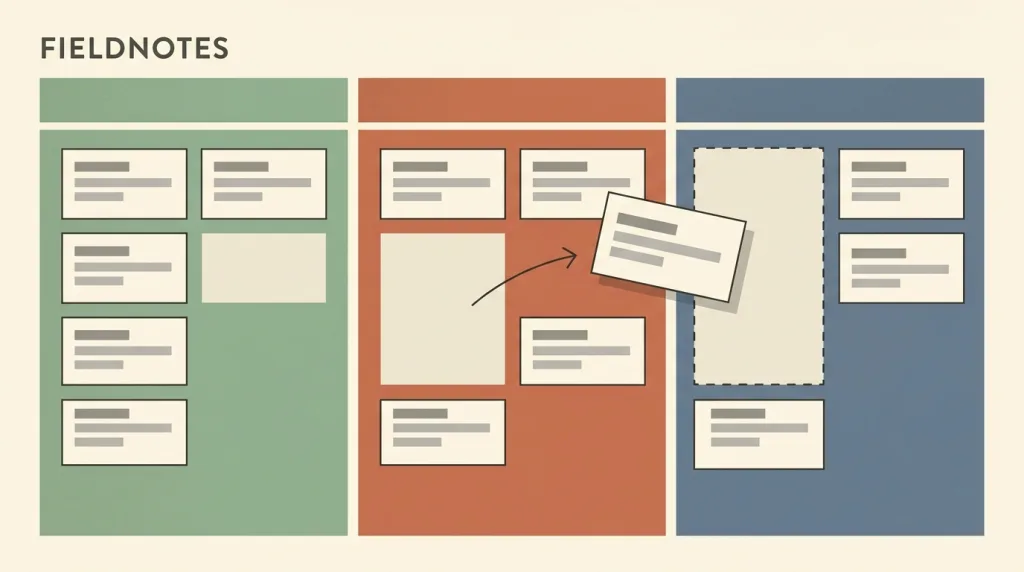
Recognizing it
- Once pressed, the object follows the pointer as a visible drag image
- Regions that can accept the object are clearly marked while dragging
- Releasing completes it and leaving a valid region cancels it
Concept boundary
Drag and drop is one technique within direct manipulation, not a synonym for it: direct manipulation also covers clicking, resizing, and editing in place. The test is that one continuous press–move–release decides the outcome. It demands more of the user than most interactions — holding and moving precisely at the same time is hard for people with tremor, operating one-handed, or using an alternative pointing device — so this entry treats an equivalent path that needs no dragging as a hard requirement rather than an optional enhancement.
When to consider it
- The spatial relationship between objects is part of the task, as in ordering or grouping
- The user needs to bring files from outside into the interface
- The destination is visible on screen and the distance is short
When to be cautious
- Dragging is the only way to do something and no equivalent single-pointer path exists
- The list is long and reaching the destination requires scrolling while dragging
- The consequence of the drop is irreversible yet there is no confirmation and no undo
Tradeoff
Spatial manipulation makes the destination obvious, at the cost of demanding fine motor control — and a drag leaves no restatable trace, so when it goes wrong users often cannot say where the thing ended up.
Conditional rules · Editorial advice
Related entries
Drag and drop is one technique within direct manipulation, which also covers clicking, resizing, and editing in place.
A drag leaves no restatable trace, so undo is the only reliable way back after a misplaced drop.
A drag must stay on target throughout, so the smaller and further the target, the longer and more error-prone the drop becomes.
An equivalent path that needs no dragging must exist — cut and paste, move up and down, or a menu that picks the destination.
Sources and what they support
The success criterion requires that all functionality using a dragging movement can be achieved by a single pointer without dragging, unless dragging is essential or the functionality is determined by the user agent and not modified by the author. The document summarises the goal as not relying on dragging for user actions and providing a simple pointer alternative for any action that involves dragging, because some people cannot use a mouse to drag items. This entry takes the equivalent-path requirement from it.
Retrieved: 2026-09-16The documentation explains that each drag-and-drop operation has an associated drag data store: the dragged data must be serialised to a string or a file and carries a type that defines how it should be interpreted; for default-draggable items such as images, links, and selections the browser defines the drag data, while custom draggable elements must have their data written by the author in the dragstart handler. This entry takes from it that a drag transfers data rather than the object itself; the documentation remains the reference for implementation.
Retrieved: 2026-09-16 · Archived 2026-09-22Definitions reference these sources. Digital specimens, selection advice, relationships, and recipes are editorial work and have not been validated through user research.
Type extensions and implementation notes
This entry has no runnable specimen; the illustration is an editorial sketch of how the drag image relates to the drop region, not a verified implementation. Before shipping, confirm function by function that a non-dragging equivalent exists and test it with a keyboard and a screen reader.
{
  "states": [
    "idle",
    "dragging",
    "over-target",
    "dropped",
    "cancelled"
  ],
  "a11y": [
    "Every draggable function has a keyboard-reachable equivalent",
    "Starting a drag, entering a target, and completing are announced through status messages",
    "Droppable regions are distinguished by more than color, with a border or icon as well"
  ],
  "motion": "Following the pointer is feedback rather than decoration; extra animation such as spring-back is dropped under a reduced-motion preference"
}
Open the Agent JSON file for this entryThis file repeats every field of this entry verbatim and adds its sources, archive status, and editorial scope.