VOCABULARY / ENTRY
Undo and Redo
undo-redo
Records completed actions in a command history so people can step back through recent changes or reapply a change that was stepped back from; undo targets actions that were already committed and took effect, not actions still in progress.
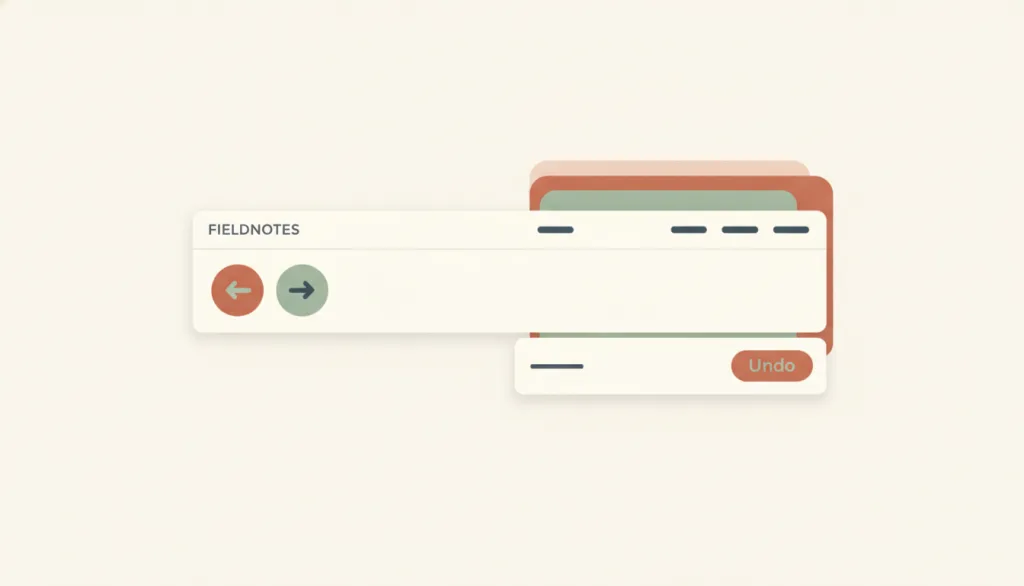
Recognizing it
- A persistent command history exists, and undo/redo can be applied repeatedly across several steps, not just once
- The undo control is visible in the interface, such as a toolbar icon, menu item, or a button inside a toast, not only reachable through a keyboard shortcut
- The undo message or label states the specific content being undone, not a generic "undone"
Concept boundary
Undo and redo is the interaction-level realization of the user-control-and-freedom principle in editing contexts, not the principle itself: the principle calls for a clear exit, and undo/redo is one such exit among several. It differs from cancel, which abandons an action that has not yet completed (an upload in progress, a form not yet submitted); undo addresses actions that have already completed and taken effect. It also differs from error prevention, which intercepts or requires confirmation before an action happens, while undo/redo offers a way back after the action happens. An undo toast is one presentation of undo, not undo itself; a toast alone with no toolbar or menu entry is not a complete implementation.
When to consider it
- An action modifies or deletes already-committed content and someone may change their mind afterward
- The task tolerates trial and error, so people need to try something and back out freely rather than confirming before every step
- Several reversible changes can happen in one session in succession, requiring multi-level undo and redo
When to be cautious
- The action has not yet completed or taken effect, in which case cancel is the right control, not undo
- The action involves a legal, financial, or otherwise irreversible external effect that genuinely cannot be reversed, so undo cannot substitute for upfront confirmation
- Treating "it's undoable" as an excuse to skip a necessary explanation or warning, in situations where someone may not even realize what just happened
Tradeoff
Undo and redo lower the cost of mistakes and encourage exploration, but they require maintaining a persistent command history and rollback logic, and actions with external side effects (such as a request that was already sent) are hard to truly reverse; a toast presentation is also limited by its display duration, which can be too short for someone to click in time.
Conditional rules · Editorial advice
Related entries
User control and freedom calls for a clear exit; undo and redo is the concrete realization of that principle for already-completed actions, not the principle itself — the principle entry does not spell out the undo/redo interface details.
Error prevention intercepts or requires confirmation before an action happens, while undo and redo offers a way back afterward; when an action truly cannot be undone, that fact should be made clear beforehand through error prevention, not disclosed only after the fact.
An undo toast folds the undo control into a status message, trading a short display window for a less intrusive interface; but the toast is only one presentation of undo, and the undo mechanism itself does not depend on it.
Sources and what they support
Undo and redo are one way to realize user control and freedom: people often make several changes in quick succession, so multi-level undo and redo should be supported rather than only undoing the last step; the undo control should sit where people expect it (toolbar or menu in WYSIWYG apps, a toast or contextual menu in web apps) and stay visible, since iOS's shake-to-undo is rarely used because it is so hard to discover.
Retrieved: 2026-09-15 · Archived 2026-09-16Distinguishes cancel/reset from undo: cancel and reset act on form input that has not yet taken effect before submission, while undo is a common command in editing systems that reverts a document to its state before the most recent change, addressing changes that have already taken effect rather than input still in progress.
Retrieved: 2026-09-15 · Archived 2026-09-16WCAG 2.2 Level AA requires that pages involving legal commitments, financial transactions, modification or deletion of user-controllable data, or test-answer submission satisfy at least one of: submissions are reversible, entered data is checked and can be corrected, or a review-and-confirm mechanism exists before finalizing; the three are recognized as equivalent mechanisms, and reversible/undoable is only one of them, not the default or only option.
Retrieved: 2026-09-15 · Archived 2026-09-16Definitions reference these sources. Digital specimens, selection advice, relationships, and recipes are editorial work and have not been validated through user research.
Type extensions and implementation notes
This entry has no working specimen yet; the illustration is an editorial sketch. Applying it to a product still requires verifying that undo actually rolls back data rather than only interface state, that actions with external side effects are honestly marked as not undoable, and that an undo toast stays reachable long enough for assistive technology.
{
"states": [
"idle",
"action-committed",
"undo-available",
"undoing",
"undone",
"redo-available",
"redoing"
],
"a11y": [
"The undo control is a real, keyboard-operable button or menu item, not a feature reachable only through a hidden shortcut",
"After undo or redo happens, the specific content undone or redone is announced to assistive technology as text",
"A toast-based undo control stays reachable long enough for assistive technology to read and activate it, rather than disappearing too quickly"
],
"motion": "The toast's appearance and dismissal do not carry the undo result itself; with reduced motion preferred, it can appear or disappear directly without a slide animation"
}Full Agent entry JSON
{
"id": "undo-redo",
"type": "interaction",
"name": {
"zh": "撤销与重做",
"en": "Undo and Redo"
},
"aliases": [
"撤销重做",
"Undo/Redo",
"Ctrl+Z"
],
"granularity": "flow",
"intents": [
"undo-action",
"confirm-action"
],
"tags": [
"undo",
"redo",
"command history",
"reversible",
"emergency exit"
],
"definition": "Records completed actions in a command history so people can step back through recent changes or reapply a change that was stepped back from; undo targets actions that were already committed and took effect, not actions still in progress.",
"boundary": "Undo and redo is the interaction-level realization of the user-control-and-freedom principle in editing contexts, not the principle itself: the principle calls for a clear exit, and undo/redo is one such exit among several. It differs from cancel, which abandons an action that has not yet completed (an upload in progress, a form not yet submitted); undo addresses actions that have already completed and taken effect. It also differs from error prevention, which intercepts or requires confirmation before an action happens, while undo/redo offers a way back after the action happens. An undo toast is one presentation of undo, not undo itself; a toast alone with no toolbar or menu entry is not a complete implementation.",
"signature": [
"A persistent command history exists, and undo/redo can be applied repeatedly across several steps, not just once",
"The undo control is visible in the interface, such as a toolbar icon, menu item, or a button inside a toast, not only reachable through a keyboard shortcut",
"The undo message or label states the specific content being undone, not a generic \"undone\""
],
"when": [
"An action modifies or deletes already-committed content and someone may change their mind afterward",
"The task tolerates trial and error, so people need to try something and back out freely rather than confirming before every step",
"Several reversible changes can happen in one session in succession, requiring multi-level undo and redo"
],
"when_not": [
"The action has not yet completed or taken effect, in which case cancel is the right control, not undo",
"The action involves a legal, financial, or otherwise irreversible external effect that genuinely cannot be reversed, so undo cannot substitute for upfront confirmation",
"Treating \"it's undoable\" as an excuse to skip a necessary explanation or warning, in situations where someone may not even realize what just happened"
],
"tradeoff": "Undo and redo lower the cost of mistakes and encourage exploration, but they require maintaining a persistent command history and rollback logic, and actions with external side effects (such as a request that was already sent) are hard to truly reverse; a toast presentation is also limited by its display duration, which can be too short for someone to click in time.",
"comparison": {
"focus": "Reversing or reapplying an action that has already completed and taken effect",
"mechanism": "Maintaining a command history that records each change so it can be replayed backward or forward",
"cost": "Storing and keeping history state consistent, plus handling actions with irreversible external effects"
},
"sources": [
{
"id": "nng-user-control-freedom",
"title": "NN/g · User Control and Freedom (Usability Heuristic #3)",
"url": "https://www.nngroup.com/articles/user-control-and-freedom/",
"claim": "Undo and redo are one way to realize user control and freedom: people often make several changes in quick succession, so multi-level undo and redo should be supported rather than only undoing the last step; the undo control should sit where people expect it (toolbar or menu in WYSIWYG apps, a toast or contextual menu in web apps) and stay visible, since iOS's shake-to-undo is rarely used because it is so hard to discover.",
"checkedAt": "2026-09-15",
"archive": {
"lookupUrl": "https://web.archive.org/web/20260915*/https://www.nngroup.com/articles/user-control-and-freedom/",
"status": "available",
"checkedAt": "2026-09-16T03:59:51.314Z",
"jobId": "spn2-3a0ff97744af06a7cb1daace1073bb8545c95cac",
"url": "https://web.archive.org/web/20260916035135/https://www.nngroup.com/articles/user-control-and-freedom/",
"timestamp": "20260916035135"
}
},
{
"id": "nng-reset-cancel-buttons",
"title": "NN/g · Reset and Cancel Buttons",
"url": "https://www.nngroup.com/articles/reset-and-cancel-buttons/",
"claim": "Distinguishes cancel/reset from undo: cancel and reset act on form input that has not yet taken effect before submission, while undo is a common command in editing systems that reverts a document to its state before the most recent change, addressing changes that have already taken effect rather than input still in progress.",
"checkedAt": "2026-09-15",
"archive": {
"lookupUrl": "https://web.archive.org/web/20260915*/https://www.nngroup.com/articles/reset-and-cancel-buttons/",
"status": "available",
"checkedAt": "2026-09-16T03:59:52.137Z",
"jobId": "spn2-0e35c97616088067a4b3b5961d3c4879bc8ca3f8",
"url": "https://web.archive.org/web/20260916040017/https://www.nngroup.com/articles/reset-and-cancel-buttons/",
"timestamp": "20260916040017"
}
},
{
"id": "wcag-error-prevention-legal-financial-data",
"title": "W3C · Understanding SC 3.3.4: Error Prevention (Legal, Financial, Data)",
"url": "https://www.w3.org/WAI/WCAG22/Understanding/error-prevention-legal-financial-data.html",
"claim": "WCAG 2.2 Level AA requires that pages involving legal commitments, financial transactions, modification or deletion of user-controllable data, or test-answer submission satisfy at least one of: submissions are reversible, entered data is checked and can be corrected, or a review-and-confirm mechanism exists before finalizing; the three are recognized as equivalent mechanisms, and reversible/undoable is only one of them, not the default or only option.",
"checkedAt": "2026-09-15",
"archive": {
"lookupUrl": "https://web.archive.org/web/20260915*/https://www.w3.org/WAI/WCAG22/Understanding/error-prevention-legal-financial-data.html",
"status": "available",
"checkedAt": "2026-09-16T04:00:13.756Z",
"jobId": "spn2-a2bf6eb9a9eda64f0ecf111bca4833c22543ba4b",
"url": "https://web.archive.org/web/20260916040037/https://www.w3.org/WAI/WCAG22/Understanding/error-prevention-legal-financial-data.html",
"timestamp": "20260916040037"
}
}
],
"relations": [
{
"target": "user-control",
"kind": "realized_by",
"condition": "An editing context needs a concrete, repeatable way to step back",
"reason": "User control and freedom calls for a clear exit; undo and redo is the concrete realization of that principle for already-completed actions, not the principle itself — the principle entry does not spell out the undo/redo interface details.",
"basis": "editorial"
},
{
"target": "error-prevention",
"kind": "composes_with",
"condition": "An action is costly but still reversible, or an action genuinely cannot be undone at all",
"reason": "Error prevention intercepts or requires confirmation before an action happens, while undo and redo offers a way back afterward; when an action truly cannot be undone, that fact should be made clear beforehand through error prevention, not disclosed only after the fact.",
"basis": "editorial"
},
{
"target": "status-message",
"kind": "composes_with",
"condition": "A deletion or modification needs an immediate way back right after it happens",
"reason": "An undo toast folds the undo control into a status message, trading a short display window for a less intrusive interface; but the toast is only one presentation of undo, and the undo mechanism itself does not depend on it.",
"basis": "editorial"
}
],
"rules": [
{
"when": "Undo is offered",
"instruction": "Place a visible undo control in the interface, such as a toolbar icon, menu item, or a button in a toast; do not rely on a keyboard shortcut alone, since someone who cannot discover it effectively has no undo at all.",
"strength": "must",
"basis": "editorial"
},
{
"when": "Confirming that an undo happened",
"instruction": "State what specifically was undone, for example \"Undid delete of Weekly Report,\" rather than a generic \"Undone.\"",
"strength": "recommend",
"basis": "editorial"
},
{
"when": "An action genuinely cannot be undone once performed",
"instruction": "Say so before it is performed and require confirmation, rather than letting someone find out it was irreversible only after the fact.",
"strength": "must",
"basis": "editorial"
}
],
"behavior": {
"states": [
"idle",
"action-committed",
"undo-available",
"undoing",
"undone",
"redo-available",
"redoing"
],
"a11y": [
"The undo control is a real, keyboard-operable button or menu item, not a feature reachable only through a hidden shortcut",
"After undo or redo happens, the specific content undone or redone is announced to assistive technology as text",
"A toast-based undo control stays reachable long enough for assistive technology to read and activate it, rather than disappearing too quickly"
],
"motion": "The toast's appearance and dismissal do not carry the undo result itself; with reduced motion preferred, it can appear or disappear directly without a slide animation"
},
"demo": null,
"version": "0.1.0",
"editorialStatus": "drafted",
"requirements": [],
"demoCapabilities": [],
"implementationNote": "This entry has no working specimen yet; the illustration is an editorial sketch. Applying it to a product still requires verifying that undo actually rolls back data rather than only interface state, that actions with external side effects are honestly marked as not undoable, and that an undo toast stays reachable long enough for assistive technology.",
"image": {
"src": "/images/undo-redo.webp",
"alt": "A fictional FIELDNOTES editor: a clearly visible undo arrow icon sits in the top toolbar, and a bottom toast reads \"Delete completed\" with an Undo button, against a faint stack of overlapping cards suggesting an action history."
},
"searchTerms": [
"撤销",
"重做",
"命令历史",
"可逆",
"紧急出口"
]
}