VOCABULARY / ENTRY
404 Page
error-404-page
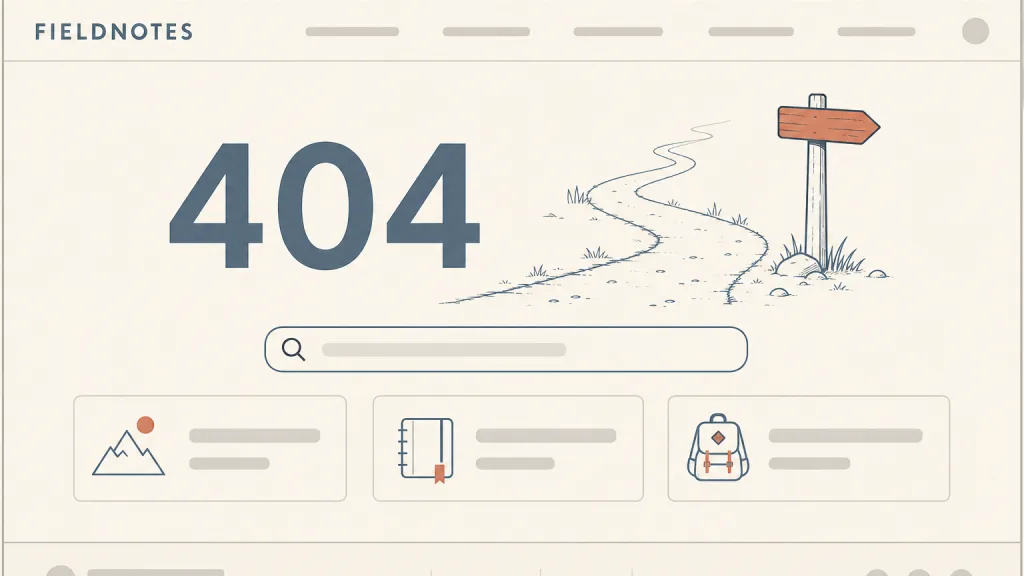
The page returned when a requested address has no matching content on the site: it says in plain words that nothing was found at this address, keeps the site’s navigation and identity, and offers ways forward such as site search, the home page or related sections — while telling browsers and crawlers, with a 404 (or 410) status code, that there is no content here.
Recognizing it
- Says in plain language that nothing was found at this address, rather than showing only “404 Not Found”
- Keeps the site header, navigation and identity, so users know they are still on the same site
- Offers ways forward: site search, the home page and related sections
- Responds with status 404 or 410, not 200
Concept boundary
This entry covers the full-page presentation of one kind of error, “not found”, not every error page: a server failure (5xx), a lack of permission (401/403) and a missing resource are different situations, and what users can do about each differs. It is not an empty state: an empty state is an existing container with nothing in it for now, while a 404 means the requested address itself has no resource. The test also includes the protocol layer: a page that looks like “not found” but responds with status 200 becomes a so-called soft 404, which search engines and tools treat as ordinary content. Playful illustrations or a brand voice are optional decoration, not the core of the pattern.
When to consider it
- Users may arrive through stale links, mistyped addresses or deleted content
- The site has enough content and structure to be worth steering users back on course
- Search engines need to know that an address no longer has content
When to be cautious
- The error is really a server fault, missing permission or a required sign-in, where “not found” would mislead
- The content is only empty for now, which calls for an empty state rather than an error page
- The address has moved permanently, where a redirect is due instead of leaving users to search
Tradeoff
A 404 page with navigation, search and an explanation turns a dead end into a crossroads, at the cost of upkeep: search suggestions, popular links and the wording all have to follow the site as it changes; and filling it with promotions distracts users at the moment they most need direction.
Conditional rules · Editorial advice
Related entries
Site search moves users from guessing addresses to finding content; prefilling the search field with keywords from the broken address saves another step.
Both explain why and offer a next step, but an empty state deals with a container that exists and is empty, while a 404 page deals with an address that does not exist; the wording and recovery paths differ.
Wayfinding asks every screen to answer “where am I, where can I go, how do I get back”; keeping the site navigation and common entry points is how a 404 page answers all three.
Keeping the sitemap-style links of the footer gives users one more set of ways forward without relisting them on the 404 page.
Sources and what they support
Section 15.5.5 of RFC 9110 (June 2022) states that the 404 status code indicates the origin server did not find a current representation for the target resource or is not willing to disclose that one exists; a 404 does not say whether this is temporary or permanent, 410 (Gone) is preferred when the server knows the condition is likely permanent, and a 404 response is heuristically cacheable by default. This entry paraphrases its status-code requirement from it.
Retrieved: 2026-10-20 · Snapshot unconfirmedJakob Nielsen’s article (14 June 1998) recommends that a 404 page explain in plain language a non-technical user can follow why the address could not be found, open with a short, slightly apologetic statement, list common address mistakes, check for valid addresses close to the requested one and offer them as links, and include a site search field. This entry paraphrases its content advice from it; the article is old, and the specific practices here are this entry’s editorial adaptation to current sites.
Retrieved: 2026-10-20 · Snapshot unconfirmedThe documentation (shown as updated 4 February 2026) explains that Google does not index URLs that return a 4xx status code and removes already indexed ones from the index, and that when a page returning 2xx looks like an error message or an empty page, Search Console reports it as a soft 404. This entry uses it to describe what happens when a page looks like “not found” but returns 200.
Retrieved: 2026-10-20 · Snapshot unconfirmedDefinitions reference these sources. Digital specimens, selection advice, relationships, and recipes are editorial work and have not been validated through user research.
Type extensions and implementation notes
This entry has no runnable specimen; the illustration is an editorial sketch of how the explanation, search and entry links relate on a 404 page, and it does not represent a verified implementation. Before shipping, confirm with a browser or the command line that broken addresses really return 404 or 410 rather than 200.
{
  "states": [
    "idle",
    "searching"
  ],
  "a11y": [
    "The page title and main heading say “page not found”, so screen-reader users learn it on arrival",
    "The search field has a visible label, and link text says where it leads rather than “click here”"
  ],
  "motion": "No motion is required; decorative animation stops under a reduced-motion preference"
}
Open the Agent JSON file for this entryThis file repeats every field of this entry verbatim and adds its sources, archive status, and editorial scope.