Design VocabularyDesign vocabulary · Edition 01

VOCABULARY / ENTRY

State Transition Animation

transition-animation

Add to comparison +

When an interface element changes from one state to another (a list row expanding into a detail panel, a card moving to a new position), a continuous change in position, form, or opacity shows the relationship between the starting and ending state, helping users understand where something went and what it became; the user who triggered the animation can disable it, and the animation must honor system-level reduced-motion preferences.
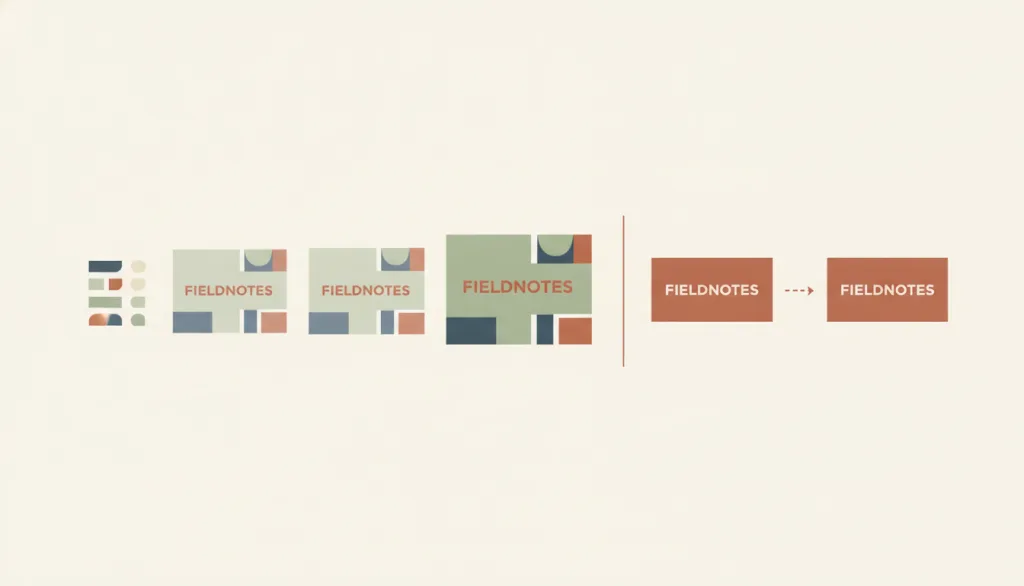
Illustration · Editorial artwork, no interactive specimen yet
A fictional FIELDNOTES card is shown in three translucent copies along a curved path, transitioning from a row in a list into an expanded panel; beside it, a simplified reduced-motion variant shows the same state change with a single simple cross-fade.

Recognizing it

  • The element moves continuously in position, form, or opacity from a starting state to a target state
  • The transition has a clear endpoint and plays once; it does not loop or represent a wait of unknown duration
  • After the animation is disabled or a reduced-motion preference is honored, the end state's content remains readable without relying on the animation

Concept boundary

State transition animation is responsible only for explaining where a state change that has happened or is about to complete came from and where it goes; the animation is explanatory, not decorative. It is not indeterminate progress, which loops with no endpoint and reports that work is still underway, and it is not pressed-state feedback, which only confirms an input was received during the brief window between press and release, regardless of whether a state changes. "Reduced motion" is not a separate entry but an adaptation variant of this one: however carefully the animation is crafted, it must be possible for whoever triggers it to disable it, and it must obey system-level preferences such as prefers-reduced-motion; once disabled, the start and end states must still be readable.

When to consider it

  • The spatial or ownership relationship between an object and its surroundings needs explaining as it expands, merges, enters, or leaves
  • The state change happens fast enough that users may lose their bearings in the new state because they did not see where it started
  • The animation is a bonus rather than a necessity, and users can turn it off in system or app settings

When to be cautious

  • The wait has no known duration or endpoint; use indeterminate progress instead of a transition animation
  • The feedback only needs to confirm that a single press was received; use pressed-state feedback instead of a transition animation
  • The user has already enabled a system-level reduced-motion preference, yet the full translation or scale animation still plays

Tradeoff

A continuous transition makes the causal relationship of a state change obvious at a glance, but it slightly delays when the user can act on the new state and can cause discomfort for users with vestibular disorders; the animation should therefore be short, disableable, and the end state must be understandable without depending on it.

Conditional rules · Editorial advice

When The animation is triggered by user interactionMustProvide a way to disable the animation and honor system-level reduced-motion preferences (such as prefers-reduced-motion), unless the animation is essential to the functionality or the information being conveyed.
When A transition animation is playingMustDo not delay the user's ability to act on the new state until the animation finishes; the animation's duration should stay within an acceptable response-wait time.
When Deciding what information the transition should conveyMustDo not rely on the animation alone to convey the state change; once the animation is disabled or skipped, the starting and ending states must still be understandable from static content.

Related entries

Indeterminate Progress Indicator ↗Related, but different · Both use motion to express system status, but one has an endpoint and the other does not

Indeterminate progress loops with no correspondence to a completion amount, showing that the system is still processing; state transition animation plays once and ends, explaining how a known starting point became a known ending point.

Pressed-State Feedback ↗Related, but different · Both are immediate visual feedback tied to a state

Pressed-state feedback only confirms that the moment of pressing was received by the system and does not involve a state actually changing; state transition animation is specifically about showing the relationship before and after a state changes.

Modal Dialog ↗Works with · A modal dialog opens from or closes back into the element that triggered it

A transition animation can expand or collapse the dialog from its trigger source, helping users understand the dialog's relationship to the content behind it, but the dialog's own accessibility behavior does not depend on this animation.

Inclusive Design ↗Explains · Designing a reduced-motion adaptation for a motion effect

Accounting for the risk to users with vestibular disorders in motion design is a concrete expression of inclusive design at the microinteraction level.

Sources and what they support

W3C WAI · Understanding SC 2.3.3 Animation from Interactions (Level AAA) ↗

This success criterion is Level AAA and requires that motion animation triggered by interaction can be disabled, unless the animation is essential to the functionality or the information being conveyed; it states that the impact of animation on people with vestibular disorders can be severe, potentially triggering nausea, migraine headaches, or needing bed rest to recover.

Retrieved: 2026-09-15 · Archived 2026-09-16
MDN · prefers-reduced-motion ↗

This media feature detects whether a user has enabled a device setting to reduce non-essential motion, with values no-preference or reduce; the documentation notes that animations such as scaling or panning large objects can be vestibular motion triggers, and developers should remove, reduce, or replace such animations under reduce.

Retrieved: 2026-09-15 · Snapshot unconfirmed

Definitions reference these sources. Digital specimens, selection advice, relationships, and recipes are editorial work and have not been validated through user research.

Type extensions and implementation notes

This entry has no operable specimen yet; the illustration is an editorial sketch. When applied to a product, still verify: whether the animation has an in-app disable switch independent of the system preference, whether enabling prefers-reduced-motion actually downgrades the animation rather than just shortening it, whether the end-state content remains fully readable when the animation is skipped, and whether the transition delays the user's next action on the new state.

{
  "states": [
    "start",
    "transitioning",
    "end"
  ],
  "a11y": [
    "The end state's content can be understood by screen reader and sighted users alike without relying on the animation",
    "An in-app disable switch is available, and the animation automatically downgrades when the system's reduced-motion preference is enabled",
    "After downgrading, a static cue that the state has changed (such as an immediate content swap or a simple cross-fade) is still provided"
  ],
  "motion": "By default, a continuous change in position, form, or opacity along a curved path that plays once and ends; under reduced motion, it downgrades to a simple cross-fade or direct replacement with no translation or scaling"
}
Full Agent entry JSON
{
  "id": "transition-animation",
  "type": "micro",
  "name": {
    "zh": "状态过渡动画",
    "en": "State Transition Animation"
  },
  "aliases": [
    "过渡动画",
    "Transition Animation",
    "State Change Animation"
  ],
  "granularity": "state",
  "intents": [
    "inform"
  ],
  "tags": [
    "transition",
    "state change",
    "reduced motion",
    "vestibular disorder",
    "motion effect"
  ],
  "definition": "When an interface element changes from one state to another (a list row expanding into a detail panel, a card moving to a new position), a continuous change in position, form, or opacity shows the relationship between the starting and ending state, helping users understand where something went and what it became; the user who triggered the animation can disable it, and the animation must honor system-level reduced-motion preferences.",
  "boundary": "State transition animation is responsible only for explaining where a state change that has happened or is about to complete came from and where it goes; the animation is explanatory, not decorative. It is not indeterminate progress, which loops with no endpoint and reports that work is still underway, and it is not pressed-state feedback, which only confirms an input was received during the brief window between press and release, regardless of whether a state changes. \"Reduced motion\" is not a separate entry but an adaptation variant of this one: however carefully the animation is crafted, it must be possible for whoever triggers it to disable it, and it must obey system-level preferences such as prefers-reduced-motion; once disabled, the start and end states must still be readable.",
  "signature": [
    "The element moves continuously in position, form, or opacity from a starting state to a target state",
    "The transition has a clear endpoint and plays once; it does not loop or represent a wait of unknown duration",
    "After the animation is disabled or a reduced-motion preference is honored, the end state's content remains readable without relying on the animation"
  ],
  "when": [
    "The spatial or ownership relationship between an object and its surroundings needs explaining as it expands, merges, enters, or leaves",
    "The state change happens fast enough that users may lose their bearings in the new state because they did not see where it started",
    "The animation is a bonus rather than a necessity, and users can turn it off in system or app settings"
  ],
  "when_not": [
    "The wait has no known duration or endpoint; use indeterminate progress instead of a transition animation",
    "The feedback only needs to confirm that a single press was received; use pressed-state feedback instead of a transition animation",
    "The user has already enabled a system-level reduced-motion preference, yet the full translation or scale animation still plays"
  ],
  "tradeoff": "A continuous transition makes the causal relationship of a state change obvious at a glance, but it slightly delays when the user can act on the new state and can cause discomfort for users with vestibular disorders; the animation should therefore be short, disableable, and the end state must be understandable without depending on it.",
  "comparison": {
    "focus": "Explaining where an element came from and what it became, not reporting how long something has been waiting",
    "mechanism": "A one-time change in position, form, or opacity with a clear start and end point",
    "cost": "Requires implementing a disable switch and a reduced-motion adaptation, or it may slow down actions or cause discomfort"
  },
  "sources": [
    {
      "id": "wcag22-animation-from-interactions",
      "title": "W3C WAI · Understanding SC 2.3.3 Animation from Interactions (Level AAA)",
      "url": "https://www.w3.org/WAI/WCAG22/Understanding/animation-from-interactions.html",
      "claim": "This success criterion is Level AAA and requires that motion animation triggered by interaction can be disabled, unless the animation is essential to the functionality or the information being conveyed; it states that the impact of animation on people with vestibular disorders can be severe, potentially triggering nausea, migraine headaches, or needing bed rest to recover.",
      "checkedAt": "2026-09-15",
      "archive": {
        "lookupUrl": "https://web.archive.org/web/20260915*/https://www.w3.org/WAI/WCAG22/Understanding/animation-from-interactions.html",
        "status": "available",
        "checkedAt": "2026-09-16T05:47:58.519Z",
        "jobId": "spn2-9f483d81ce18ab6f62b96e83d221135f777bd100",
        "url": "https://web.archive.org/web/20260916054822/https://www.w3.org/WAI/WCAG22/Understanding/animation-from-interactions.html",
        "timestamp": "20260916054822"
      }
    },
    {
      "id": "mdn-prefers-reduced-motion",
      "title": "MDN · prefers-reduced-motion",
      "url": "https://developer.mozilla.org/en-US/docs/Web/CSS/@media/prefers-reduced-motion",
      "claim": "This media feature detects whether a user has enabled a device setting to reduce non-essential motion, with values no-preference or reduce; the documentation notes that animations such as scaling or panning large objects can be vestibular motion triggers, and developers should remove, reduce, or replace such animations under reduce.",
      "checkedAt": "2026-09-15",
      "archive": {
        "lookupUrl": "https://web.archive.org/web/20260915*/https://developer.mozilla.org/en-US/docs/Web/CSS/@media/prefers-reduced-motion",
        "status": "pending",
        "checkedAt": "2026-09-16T05:48:16.625Z",
        "error": "status-request-failed",
        "jobId": "spn2-2c6b3a877688a0100a9b7e7ad1d265959f60099b"
      }
    }
  ],
  "relations": [
    {
      "target": "indeterminate-progress",
      "kind": "related",
      "condition": "Both use motion to express system status, but one has an endpoint and the other does not",
      "reason": "Indeterminate progress loops with no correspondence to a completion amount, showing that the system is still processing; state transition animation plays once and ends, explaining how a known starting point became a known ending point.",
      "basis": "editorial"
    },
    {
      "target": "pressed-state",
      "kind": "related",
      "condition": "Both are immediate visual feedback tied to a state",
      "reason": "Pressed-state feedback only confirms that the moment of pressing was received by the system and does not involve a state actually changing; state transition animation is specifically about showing the relationship before and after a state changes.",
      "basis": "editorial"
    },
    {
      "target": "modal-dialog",
      "kind": "composes_with",
      "condition": "A modal dialog opens from or closes back into the element that triggered it",
      "reason": "A transition animation can expand or collapse the dialog from its trigger source, helping users understand the dialog's relationship to the content behind it, but the dialog's own accessibility behavior does not depend on this animation.",
      "basis": "editorial"
    },
    {
      "target": "inclusive-design",
      "kind": "informs",
      "condition": "Designing a reduced-motion adaptation for a motion effect",
      "reason": "Accounting for the risk to users with vestibular disorders in motion design is a concrete expression of inclusive design at the microinteraction level.",
      "basis": "editorial"
    }
  ],
  "rules": [
    {
      "when": "The animation is triggered by user interaction",
      "instruction": "Provide a way to disable the animation and honor system-level reduced-motion preferences (such as prefers-reduced-motion), unless the animation is essential to the functionality or the information being conveyed.",
      "strength": "must",
      "basis": "editorial"
    },
    {
      "when": "A transition animation is playing",
      "instruction": "Do not delay the user's ability to act on the new state until the animation finishes; the animation's duration should stay within an acceptable response-wait time.",
      "strength": "must",
      "basis": "editorial"
    },
    {
      "when": "Deciding what information the transition should convey",
      "instruction": "Do not rely on the animation alone to convey the state change; once the animation is disabled or skipped, the starting and ending states must still be understandable from static content.",
      "strength": "must",
      "basis": "editorial"
    }
  ],
  "behavior": {
    "states": [
      "start",
      "transitioning",
      "end"
    ],
    "a11y": [
      "The end state's content can be understood by screen reader and sighted users alike without relying on the animation",
      "An in-app disable switch is available, and the animation automatically downgrades when the system's reduced-motion preference is enabled",
      "After downgrading, a static cue that the state has changed (such as an immediate content swap or a simple cross-fade) is still provided"
    ],
    "motion": "By default, a continuous change in position, form, or opacity along a curved path that plays once and ends; under reduced motion, it downgrades to a simple cross-fade or direct replacement with no translation or scaling"
  },
  "demo": null,
  "version": "0.1.0",
  "editorialStatus": "drafted",
  "requirements": [],
  "demoCapabilities": [],
  "implementationNote": "This entry has no operable specimen yet; the illustration is an editorial sketch. When applied to a product, still verify: whether the animation has an in-app disable switch independent of the system preference, whether enabling prefers-reduced-motion actually downgrades the animation rather than just shortening it, whether the end-state content remains fully readable when the animation is skipped, and whether the transition delays the user's next action on the new state.",
  "image": {
    "src": "/images/transition-animation.webp",
    "alt": "A fictional FIELDNOTES card is shown in three translucent copies along a curved path, transitioning from a row in a list into an expanded panel; beside it, a simplified reduced-motion variant shows the same state change with a single simple cross-fade."
  },
  "searchTerms": [
    "过渡",
    "状态变化",
    "减少动态",
    "前庭障碍",
    "动效"
  ]
}